Start with Serverless SQL pool
Serverless query service that enables you to run SQL queries on files placed in Azure Storage.
Setup
- Create database for your views (in case you want to use views)
- Create credentials to be used by serverless SQL pool to access files in storage
Create database
CREATE DATABASE mydbnameCreate data source
To run queries using serverless SQL pool, create data source that serverless SQL pool can use to access files in storage.
-- create master key that will protect the credentials:
CREATE MASTER KEY ENCRYPTION BY PASSWORD = <enter very strong password here>

-- create credentials for containers in our demo storage account
CREATE DATABASE SCOPED CREDENTIAL sqlondemand
WITH IDENTITY='SHARED ACCESS SIGNATURE',
SECRET = 'sv=2018-03-28&ss=bf&srt=sco&sp=rl&st=2019-10-14T12%3A10%3A25Z&se=2061-12-31T12%3A10%3A00Z&sig=KlSU2ullCscyTS0An0nozEpo4tO5JAgGBvw%2FJX2lguw%3D'
GO
CREATE EXTERNAL DATA SOURCE SqlOnDemandDemo WITH (
    LOCATION = 'https://sqlondemandstorage.blob.core.windows.net',
    CREDENTIAL = sqlondemand
);
Query CSV files
How to read a CSV file that doesn’t contain a header row
SELECT TOP 10 *
FROM OPENROWSET
  (
      BULK 'csv/population/*.csv',
      DATA_SOURCE = 'SqlOnDemandDemo',
      FORMAT = 'CSV', PARSER_VERSION = '2.0'
  )
WITH
  (
      country_code VARCHAR (5)
    , country_name VARCHAR (100)
    , year smallint
    , population bigint
  ) AS r
WHERE
  country_name = 'Luxembourg' AND year = 2017
Query Parquet files
SELECT COUNT_BIG(*)
FROM OPENROWSET
  (
      BULK 'parquet/taxi/year=2017/month=9/*.parquet',
      DATA_SOURCE = 'SqlOnDemandDemo',
      FORMAT='PARQUET'
  ) AS nyc
Query JSON files
JSON sample file
Files are stored in json container, folder books, and contain single book entry with following structure:
{
   "_id":"ahokw88",
   "type":"Book",
   "title":"The AWK Programming Language",
   "year":"1988",
   "publisher":"Addison-Wesley",
   "authors":[
      "Alfred V. Aho",
      "Brian W. Kernighan",
      "Peter J. Weinberger"
   ],
   "source":"DBLP"
}
Query JSON files
SELECT
    JSON_VALUE(jsonContent, '$.title') AS title
  , JSON_VALUE(jsonContent, '$.publisher') as publisher
  , jsonContent
FROM OPENROWSET
  (
      BULK 'json/books/*.json',
      DATA_SOURCE = 'SqlOnDemandDemo'
    , FORMAT='CSV'
    , FIELDTERMINATOR ='0x0b'
    , FIELDQUOTE = '0x0b'
    , ROWTERMINATOR = '0x0b'
  )
WITH
  ( jsonContent varchar(8000) ) AS [r]
WHERE
  JSON_VALUE(jsonContent, '$.title') = 'Probabilistic and Statistical Methods in Cryptology, An Introduction by Selected Topics'
Start with dedicated SQL pool
- Create a dedicated SQL pool using Synapse Studio
- Create a dedicated SQL pool using the Azure portal
Bulk load data using the COPY statement
Run the following COPY statement that will load data from the Azure blob storage account into the table.
COPY INTO [dbo].[Trip] FROM 'https://nytaxiblob.blob.core.windows.net/2013/Trip2013/'
WITH (
   FIELDTERMINATOR='|',
   ROWTERMINATOR='0x0A'
) OPTION (LABEL = 'COPY: dbo.trip');
Monitor the load
SELECT  r.[request_id]
,       r.[status]
,       r.resource_class
,       r.command
,       sum(bytes_processed) AS bytes_processed
,       sum(rows_processed) AS rows_processed
FROM    sys.dm_pdw_exec_requests r
              JOIN sys.dm_pdw_dms_workers w
                     ON r.[request_id] = w.request_id
WHERE [label] = 'COPY: dbo.trip' and session_id <> session_id() and type = 'WRITER'
GROUP BY r.[request_id]
,       r.[status]
,       r.resource_class
,       r.command;
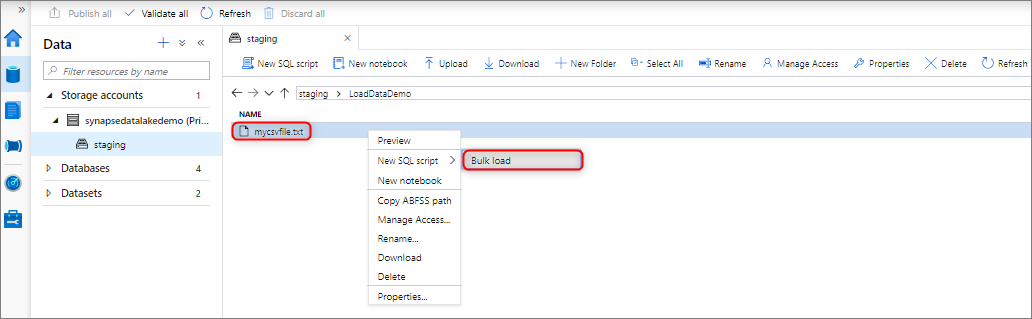
Bulk loading with Synapse Studio
You can bulk load data by right-clicking the following area within Synapse Studio: a file or folder from an Azure storage account that’s attached to your workspace.
Workload Management
Scale compute for an Azure Synapse dedicated SQL pool in a Synapse workspace with the Azure portal
SQL pool compute resources can be scaled by increasing or decreasing data warehouse units.

Scale compute for dedicated SQL pools in Azure Synapse Workspaces with Azure PowerShell
Update-AzSynapseSqlPool -ResourceGroupName "contoso" -Workspacename "contoso-synapse-workspace" -name "contoso_dedicated_sql_pool" -PerformanceLevel "DW300c"Scale compute for dedicated SQL pool (formerly SQL DW) in Azure Synapse Analytics using T-SQL
ALTER DATABASE mySampleDataWarehouse
MODIFY (SERVICE_OBJECTIVE = 'DW300c');
