Introduction
Cloud environments have transformed the way organizations build, deploy, and manage applications. However, as cloud adoption continues to grow, security challenges also increase. Traditional security processes often struggle to keep pace with dynamic cloud infrastructures, frequent deployments, and evolving cyber threats. As a result, organizations need a faster, smarter, and more scalable approach to protecting their cloud environments.
Cloud Security Automation addresses this challenge by automating repetitive security tasks, improving visibility, reducing human error, and enabling faster incident response. Instead of relying solely on manual monitoring and intervention, organizations use automated tools and workflows to detect vulnerabilities, enforce compliance, manage configurations, and respond to threats in real time.
Organizations looking to strengthen cloud operations and security often seek guidance from experts such as Cloudopsnow, which focuses on modern cloud operations, automation practices, infrastructure management, and cloud security strategies. By combining the right tools, processes, and operational discipline, businesses can build secure cloud environments that support innovation while minimizing risk.
This comprehensive guide explores Cloud Security Automation, its tools, implementation strategies, operational concepts, best practices, common mistakes, career opportunities, and real-world applications.
What Is Cloud Security Automation?
Cloud Security Automation refers to the use of technology, workflows, scripts, policies, and automated processes to perform security-related activities within cloud environments without requiring continuous manual intervention. These activities include monitoring, threat detection, compliance validation, access control management, vulnerability scanning, patch management, incident response, and security policy enforcement.
In traditional environments, security teams manually review logs, check configurations, apply updates, and investigate alerts. While these methods can work for small infrastructures, they become inefficient when organizations manage hundreds or thousands of cloud resources. Automation solves this challenge by continuously monitoring environments and taking predefined actions whenever specific conditions are detected.
Cloud Security Automation allows organizations to identify risks faster, respond to incidents more effectively, and maintain consistent security standards across complex environments. It also helps security teams focus on strategic initiatives rather than repetitive operational tasks. As cloud infrastructures continue to expand, automation becomes an essential component of modern security operations.
Why Cloud Security Automation Matters
Modern organizations operate in highly dynamic environments where cloud resources can be created, modified, or removed within minutes. This speed creates significant operational advantages, but it also introduces new security challenges. Manual processes cannot keep up with the pace of change, making automation necessary for maintaining security.
Security automation improves consistency across environments. Every security policy can be applied uniformly, reducing the risk of configuration drift and human mistakes. Automated systems can continuously validate infrastructure settings and immediately identify deviations from approved standards.
Another major advantage is faster incident response. Security threats often evolve rapidly, and delayed responses can result in substantial damage. Automated response mechanisms can isolate compromised systems, revoke access privileges, and trigger investigations within seconds.
Organizations also benefit from improved compliance management. Automated compliance checks ensure that security controls remain aligned with regulatory requirements and internal governance policies. This proactive approach reduces audit preparation efforts and improves overall operational efficiency.
Core Components of Cloud Security Automation
Successful cloud security automation relies on several interconnected components working together to protect cloud resources and applications.
Security Monitoring
Security monitoring continuously collects and analyzes information from cloud resources. Automated monitoring systems identify suspicious activities, unusual behavior patterns, and potential security threats before they become major incidents.
Vulnerability Management
Automated vulnerability scanners identify weaknesses across operating systems, applications, containers, and cloud services. These tools provide continuous assessments and help prioritize remediation efforts based on risk levels.
Identity and Access Management
Automated identity management ensures users receive appropriate permissions while preventing excessive access privileges. Access policies can be automatically enforced, updated, and audited to maintain strong security controls.
Compliance Automation
Compliance automation continuously evaluates cloud environments against regulatory frameworks and organizational standards. Automated assessments help organizations maintain compliance without requiring constant manual reviews.
Incident Response Automation
Incident response automation executes predefined actions when security events occur. Automated workflows help reduce response times and improve containment efforts during security incidents.
Popular Cloud Security Automation Tools
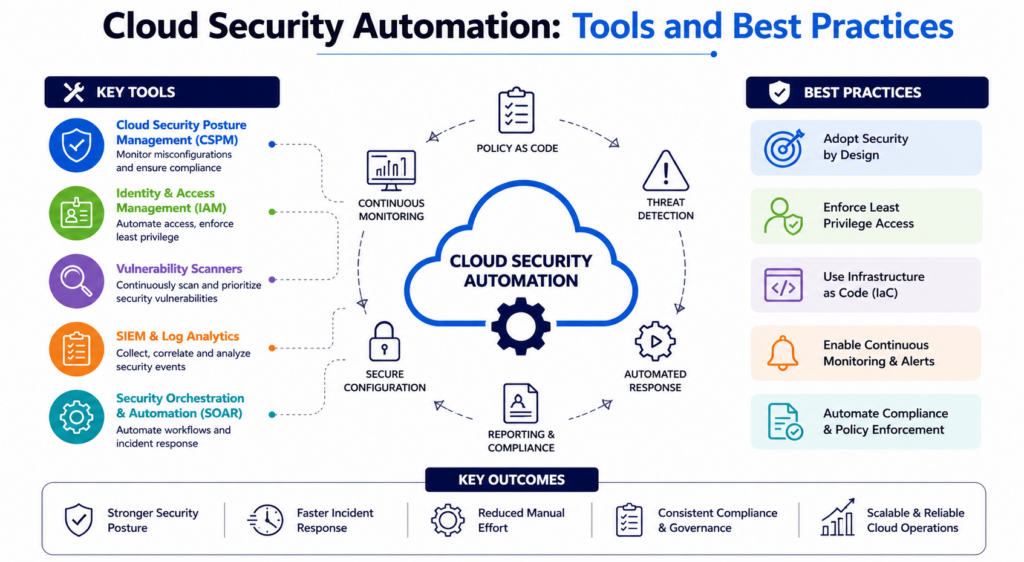
Organizations use various tools to automate security operations across cloud environments. Each tool addresses specific security challenges while contributing to a broader security strategy.
Infrastructure as Code Security Tools
Infrastructure as Code security tools analyze cloud templates and configurations before deployment. These tools identify misconfigurations, insecure settings, and policy violations early in the development lifecycle.
Examples include configuration validation platforms that scan templates for security risks and enforce organizational policies before resources reach production environments.
Cloud Security Posture Management Platforms
Cloud Security Posture Management solutions continuously monitor cloud environments for security weaknesses. They automatically identify exposed storage resources, excessive permissions, misconfigured services, and compliance violations.
These platforms provide centralized visibility into cloud security risks while helping organizations maintain secure configurations across multiple cloud providers.
Security Information and Event Management Systems
Security Information and Event Management systems aggregate logs from multiple sources and automate threat detection activities. These platforms correlate security events, identify suspicious patterns, and trigger response workflows when necessary.
By centralizing security data, organizations gain better visibility into potential threats and operational risks.
Container Security Platforms
Container security tools automate vulnerability scanning, runtime protection, and compliance validation for containerized applications. These platforms help organizations secure container environments throughout the application lifecycle.
Automated container security ensures vulnerabilities are identified before deployment while maintaining continuous protection during production operations.
Security Orchestration Platforms
Security orchestration solutions connect multiple security tools and automate incident response processes. They eliminate manual coordination efforts and accelerate security operations through predefined workflows.
These platforms enable organizations to create repeatable security procedures that improve efficiency and consistency.
Best Practices for Cloud Security Automation
Cloud Security Automation delivers maximum value when implemented using proven operational practices.
Adopt Security by Design
Organizations should integrate security into every stage of the cloud lifecycle. Security controls should be incorporated during planning, development, testing, deployment, and operations rather than being added after implementation.
This proactive approach reduces vulnerabilities and improves overall security posture.
Automate Policy Enforcement
Manual policy reviews often lead to inconsistencies. Automated policy enforcement ensures security standards remain consistently applied across all cloud resources.
Organizations should establish clear policies for resource creation, access management, encryption, networking, and compliance requirements.
Implement Continuous Monitoring
Continuous monitoring provides real-time visibility into cloud environments. Organizations should monitor infrastructure, applications, user activities, network traffic, and configuration changes.
Automated monitoring helps detect threats quickly while reducing operational blind spots.
Use Least Privilege Access
Access management should follow the principle of least privilege. Users and applications should receive only the permissions required to perform their tasks.
Automated access reviews help identify excessive permissions and reduce potential attack surfaces.
Automate Compliance Validation
Compliance requirements evolve frequently. Automated compliance validation ensures environments remain aligned with applicable regulations and organizational standards.
Continuous assessments reduce audit preparation efforts while improving governance effectiveness.
Key Operational Concepts You Must Know
Understanding cloud security automation requires familiarity with several important operational concepts that influence security effectiveness and operational efficiency.
Infrastructure as Code
Infrastructure as Code enables organizations to define cloud resources using configuration files instead of manual provisioning processes. This approach improves consistency, repeatability, and scalability while allowing security policies to be embedded directly into infrastructure definitions.
Because configurations are stored as code, teams can review changes, track modifications, and automate security validations before deployment. This significantly reduces configuration-related security risks.
Immutable Infrastructure
Immutable infrastructure prevents direct modifications to deployed systems. Instead of changing existing resources, organizations replace them with updated versions. This approach reduces configuration drift and improves security consistency across environments.
Security teams benefit because every deployment follows standardized and validated processes, reducing opportunities for unauthorized changes.
Continuous Compliance
Continuous compliance involves ongoing monitoring and validation of security controls rather than periodic audits. Automated systems continuously assess environments against established requirements and immediately identify deviations.
This approach improves visibility, reduces compliance risks, and supports proactive remediation efforts.
Security as Code
Security as Code integrates security requirements directly into development and operational workflows. Policies, controls, and compliance requirements become programmable and automatically enforceable.
This concept enables organizations to scale security operations while maintaining consistency across rapidly changing cloud environments.
Automated Remediation
Automated remediation involves predefined actions that address security issues without requiring manual intervention. Examples include disabling exposed services, correcting misconfigurations, or isolating compromised resources.
Automated remediation reduces response times and minimizes the impact of security incidents.
Platform Implementation vs. Culture — What’s the Real Difference?
Many organizations invest heavily in security tools and platforms but still struggle to achieve meaningful security improvements. The reason often lies in the difference between platform implementation and organizational culture.
Platform implementation focuses on technology adoption. Organizations deploy monitoring systems, automation platforms, compliance tools, and security controls. These technologies provide the foundation for automation, but technology alone does not guarantee success.
Culture focuses on how people think, collaborate, and prioritize security. Organizations with strong security cultures encourage shared responsibility, continuous learning, proactive risk management, and cross-functional collaboration. Security becomes an integral part of daily operations rather than an isolated function.
When organizations focus exclusively on technology, teams may bypass controls, ignore alerts, or treat security as someone else’s responsibility. Conversely, organizations with strong security cultures often achieve better results because employees actively support security objectives.
The most successful cloud security automation initiatives combine advanced technology with a culture that values accountability, transparency, and continuous improvement. Technology enables automation, while culture ensures that automation aligns with organizational goals and operational practices.
Real-World Use Cases of Modern Operations
Cloud Security Automation supports numerous real-world operational scenarios that improve security, efficiency, and reliability.
Automated Vulnerability Management
Organizations continuously scan cloud environments for vulnerabilities. When critical issues are detected, automated workflows generate remediation tasks, notify responsible teams, and track resolution progress.
This process reduces exposure windows and improves overall risk management.
Compliance Monitoring
Many industries operate under strict regulatory requirements. Automated compliance systems continuously assess infrastructure against regulatory frameworks and generate alerts when violations occur.
Organizations can maintain compliance more effectively while reducing manual audit preparation efforts.
Threat Detection and Response
Security monitoring systems analyze logs, user activities, and network traffic to identify suspicious behavior. Automated response workflows can isolate affected resources, block malicious activities, and initiate investigations.
This approach significantly reduces incident response times.
Access Management Automation
Organizations automate user provisioning, permission reviews, and access revocation processes. Automated controls ensure users receive appropriate access while reducing administrative overhead.
Access management automation strengthens security while improving operational efficiency.
Secure Deployment Pipelines
Development teams integrate security validations into deployment pipelines. Automated checks identify vulnerabilities, policy violations, and configuration issues before applications reach production environments.
This practice improves software quality and reduces deployment-related security risks.
Common Mistakes in Operations Engineering
Even well-intentioned organizations often make mistakes that limit the effectiveness of cloud security automation initiatives.
Over-Automating Without Strategy
Automation should support clearly defined objectives. Organizations sometimes automate processes without understanding their operational requirements, leading to complexity and inefficiencies.
Effective automation begins with clear goals and measurable outcomes.
Ignoring Alert Quality
Poorly configured monitoring systems can generate excessive alerts. Security teams may become overwhelmed and begin ignoring important notifications.
Organizations should continuously refine detection rules to improve alert accuracy and reduce noise.
Lack of Documentation
Automated systems require thorough documentation. Without clear documentation, troubleshooting becomes difficult, and operational knowledge remains concentrated among a small number of individuals.
Documentation supports consistency, training, and long-term maintainability.
Weak Access Controls
Automation platforms often require elevated permissions. Organizations sometimes grant excessive access privileges, creating unnecessary security risks.
Access should always follow least privilege principles and undergo regular reviews.
Failure to Test Automation
Automated workflows should be tested regularly to verify expected behavior. Untested automation can produce unexpected results during critical situations.
Routine testing helps ensure reliability and operational effectiveness.
How to Become an Operations Expert — Career Roadmap
Cloud security automation creates exciting career opportunities for professionals interested in cloud computing, cybersecurity, and operational excellence.
Build Strong Technical Foundations
Start by learning operating systems, networking, cloud computing fundamentals, scripting languages, and security principles. These foundational skills provide the knowledge required to understand modern cloud environments.
A strong technical base helps professionals adapt to evolving technologies and operational practices.
Learn Cloud Platforms
Develop expertise in major cloud platforms and their security services. Understanding cloud architecture, networking, identity management, storage systems, and monitoring capabilities is essential for operational success.
Hands-on experience significantly accelerates learning and skill development.
Master Automation Technologies
Automation is a core requirement for modern operations. Professionals should learn scripting languages, Infrastructure as Code tools, configuration management platforms, and workflow automation systems.
These skills enable efficient management of large-scale cloud environments.
Develop Security Knowledge
Security expertise enhances operational effectiveness. Professionals should understand vulnerability management, threat detection, compliance frameworks, access controls, and incident response procedures.
Security knowledge supports proactive risk management and operational resilience.
Gain Real-World Experience
Practical experience is invaluable. Participate in projects involving cloud deployments, security automation, monitoring systems, and operational improvements.
Real-world challenges help professionals develop problem-solving abilities and operational judgment.
Focus on Continuous Learning
Technology evolves rapidly. Successful operations professionals continuously expand their knowledge through training, experimentation, certifications, and community engagement.
Continuous learning ensures long-term career growth and relevance.
FAQ Section
What is Cloud Security Automation?
Cloud Security Automation is the process of using automated tools and workflows to manage security tasks such as monitoring, compliance validation, vulnerability detection, access management, and incident response within cloud environments.
Why is Cloud Security Automation important?
It improves security consistency, reduces manual effort, accelerates incident response, minimizes human errors, and helps organizations manage increasingly complex cloud infrastructures.
Which teams benefit from security automation?
Security teams, cloud engineers, DevOps professionals, compliance specialists, operations teams, and development teams all benefit from automated security processes.
Can small organizations implement Cloud Security Automation?
Yes. Small organizations can start with basic monitoring, vulnerability scanning, and compliance automation before gradually expanding their automation capabilities.
Does automation replace security professionals?
No. Automation handles repetitive tasks and improves efficiency, while security professionals provide strategic oversight, decision-making, risk assessment, and incident investigation expertise.
What are the biggest challenges in implementing security automation?
Common challenges include tool integration complexity, insufficient planning, lack of skilled personnel, poor documentation, excessive alert noise, and organizational resistance to change.
How does automation support compliance?
Automation continuously evaluates systems against regulatory requirements and organizational policies, helping maintain compliance while reducing manual audit preparation efforts.
Is Cloud Security Automation only for large enterprises?
No. Organizations of all sizes can benefit from automation. Even small cloud environments gain improved visibility, consistency, and security through automated processes.
Final Summary
Cloud Security Automation has become a critical capability for organizations operating in modern cloud environments. As infrastructures grow more dynamic and threats become increasingly sophisticated, manual security processes can no longer provide sufficient protection. Automation enables organizations to monitor environments continuously, detect risks quickly, enforce security policies consistently, and respond to incidents more effectively.
Successful cloud security automation combines technology, processes, and culture. Organizations must understand operational concepts such as Infrastructure as Code, Security as Code, continuous compliance, immutable infrastructure, and automated remediation. At the same time, they must foster a culture that treats security as a shared responsibility across teams.
By implementing the right tools, following proven best practices, avoiding common operational mistakes, and investing in continuous learning, organizations can build resilient cloud environments that support innovation while maintaining strong security controls. For professionals, cloud security automation also offers rewarding career opportunities that combine cloud expertise, operational excellence, and cybersecurity knowledge into one highly valuable skill set.
