Variables (Vars)
Variables are an essential part of Ansible playbooks, allowing you to make your playbooks more flexible and reusable.
Types of Variables:
Variables in Playbook:
- Define variables directly in the playbook.
vars:
  apache_package: apache2
Variables in a Vars File:
- Define variables in a separate YAML file and include it in your playbook.
vars_files:
  - vars/main.yml
Variables Using Prompt:
- Prompt the user to input variable values during playbook execution.
vars_prompt:
  - name: "apache_package"
    prompt: "Enter the Apache package name"
    private: no
Variables at Task Level:
- Define variables for specific tasks within the playbook.
tasks:
  - name: Install Apache
    ansible.builtin.apt:
      name: "{{ apache_package }}"
      state: present
    vars:
      apache_package: apache2
Variables from Task Output:
- Capture the output of a task and use it as a variable in subsequent tasks.
tasks:
  - name: Get system information
    ansible.builtin.command: uname -r
    register: kernel_version

  - name: Display system information
    ansible.builtin.debug:
      msg: "Kernel version is {{ kernel_version.stdout }}"

- Inventories: You can define variables in your inventory files, either globally for all hosts or specific to particular groups or hosts.
- Host or Group Variables: Create separate files for host or group variables inside the
host_varsandgroup_varsdirectories within your Ansible project. - Playbook-level Variables: Declare variables at the top level of your playbook using the
varskeyword.
Ansible Variable in Playbook with following ways:
- Use variables in playbook directly
- Use variables using external var files in playbook
- Use variables using include_vars into task in playbook
- Use variables using User Prompt in playbook
- Use variables using outout of task using register
List of Way to declare variables in Playbook

- Playbook-level Variables: Declare variables at the top level of your playbook using the vars keyword.
- Task-level Variables: You can also define variables within specific tasks.
- Register Variables: You can capture the output of a task into a variable using the register keyword.
- Environment Variables: You can use environment variables by accessing them using Ansible’s ansible_env dictionary.
- Using Facts: Ansible gathers facts about managed hosts, and you can use these facts as variables in your playbooks.
- Prompting for User Input: You can use the vars_prompt keyword to prompt the user for input during playbook execution.
Declare variables at the top level of your playbook using the vars keyword.
- name: Example playbook
  hosts: all
  vars:
    variable_name: value
  tasks:
    # Your tasks here
Task-level Variables:
- name: Example playbook
  hosts: all
  tasks:
    - name: Task with variables
      debug:
        msg: "My variable: {{ variable_name }}"
      vars:
        variable_name: value
Register Variables:
- name: Example playbook
  hosts: all
  tasks:
    - name: Task with register
      shell: echo "Hello, world!"
      register: output
    - name: Display registered variable
      debug:
        var: output.stdout
Environment Variables:
- name: Example playbook
  hosts: all
  tasks:
    - name: Display environment variable
      debug:
        var: ansible_env.VARIABLE_NAME
Using Facts:
- name: Example playbook
  hosts: all
  tasks:
    - name: Display fact
      debug:
        var: ansible_facts['ansible_os_family']
Prompting for User Input:
- name: Example playbook
  hosts: all
  vars_prompt:
    - name: variable_name
      prompt: "Enter a value for the variable:"
  tasks:
    - name: Display input variable
      debug:
        var: variable_name
Ansible Playbook with Variable for Ubuntu
---
- name: Update web servers
  hosts: web
  vars:
    myname: "Rajeshkumar"
    age: "18"
    packagename: "apache2"
    servicename: "apache2"
  vars_files:
    - "vars.yaml"
  vars_prompt:
    - name: "version"
      prompt: "Which version Do you want to install?"
      private: no

  tasks:
  - name: Install Apache in ubuntu
    ansible.builtin.apt:
      name: "{{ packagename }}"
      state: latest
  - name: Copy index.html
    ansible.builtin.copy:
      src: index.html
      dest: /var/www/html/index.html
  - name: Starting a Apache Server
    ansible.builtin.service:
      name: "{{ servicename }}"
      state: started
  - name: Print return information from the previous task
    ansible.builtin.debug:
      var: myname
  - name: include default step variables
    include_vars: tasks_var.yaml
  - name: Print return information from the previous task
    ansible.builtin.debug:
      msg: "My Name is {{ myname }} and My age is {{ age }}"
  - name: Print return information from the previous task
    ansible.builtin.debug:
      var: version
  - name: Ansible register variable basic example
    shell: "find *.txt"
    args:
      chdir: "/root/ansible"
    register: find_output
  - debug:
      var: find_output
  - debug:
      var: find_output.stdout_lines
  - debug:
      var: find_output.stdout_lines[0]
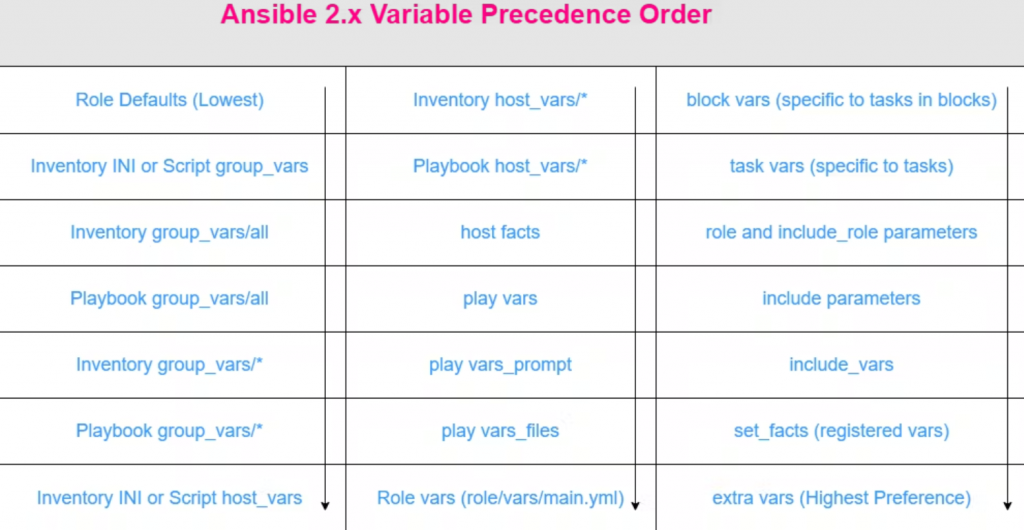
Ansible Varialble Precedence
Fact Variables
In Ansible, fact variables (often referred to simply as “facts”) are automatically discovered variables about the managed hosts. These facts are collected by the setup module and include details about the system, such as network interfaces, operating system, hardware, and other configuration details. Facts are useful for making playbooks more dynamic and adaptable to different environments.
Collecting Facts
By default, Ansible collects facts at the beginning of each play. This behavior can be controlled with the gather_facts attribute in the playbook.
Accessing Facts
Facts are accessible using the ansible_facts dictionary or directly by their names. Here are some common facts and how to use them:
Examples of Fact Variables
ansible localhost -m setup
ansible localhost -m setup | grep -i os
Operating System Family:
ansible_facts['os_family']
Example value: Debian, RedHat
Hostname:
ansible_facts['hostname']
- Example value:
webserver01
IP Address of a Specific Interface:
ansible_facts['ansible_eth0']['ipv4']['address']- Example value:
192.168.1.100
Total Memory:
ansible_facts['memtotal_mb']
Example value: 4096
Processor Count:
ansible_facts['processor_vcpus']
Example value: 4
Using Facts in Playbooks
Facts can be used in playbooks to make tasks conditional or to template files dynamically. Here’s an example playbook that demonstrates how to use facts:
Example Playbook
---
- name: Configure web servers based on facts
  hosts: webservers
  gather_facts: yes
  become: yes
  tasks:
    - name: Print the operating system
      ansible.builtin.debug:
        msg: "The operating system is {{ ansible_facts['os_family'] }}"

    - name: Ensure Apache is installed on Debian-based systems
      ansible.builtin.apt:
        name: apache2
        state: present
      when: ansible_facts['os_family'] == "Debian"

    - name: Ensure httpd is installed on RedHat-based systems
      ansible.builtin.yum:
        name: httpd
        state: present
      when: ansible_facts['os_family'] == "RedHat"

    - name: Template a file with the hostname
      ansible.builtin.template:
        src: templates/index.html.j2
        dest: /var/www/html/index.html
      vars:
        hostname: "{{ ansible_facts['hostname'] }}"

    - name: Print the IP address of eth0
      ansible.builtin.debug:
        msg: "The IP address of eth0 is {{ ansible_facts['ansible_eth0']['ipv4']['address'] }}"
Custom Facts
In addition to the built-in facts, you can define custom facts. Custom facts can be added to /etc/ansible/facts.d as JSON, INI, or executable scripts that output JSON.
Example Custom Fact (/etc/ansible/facts.d/custom.fact):
[general]
application_version=1.2.3
Accessing Custom Fact in Playbook:
---
- name: Use custom facts
  hosts: webservers
  gather_facts: yes
  tasks:
    - name: Print custom application version
      ansible.builtin.debug:
        msg: "The application version is {{ ansible_facts['custom']['general']['application_version'] }}"

