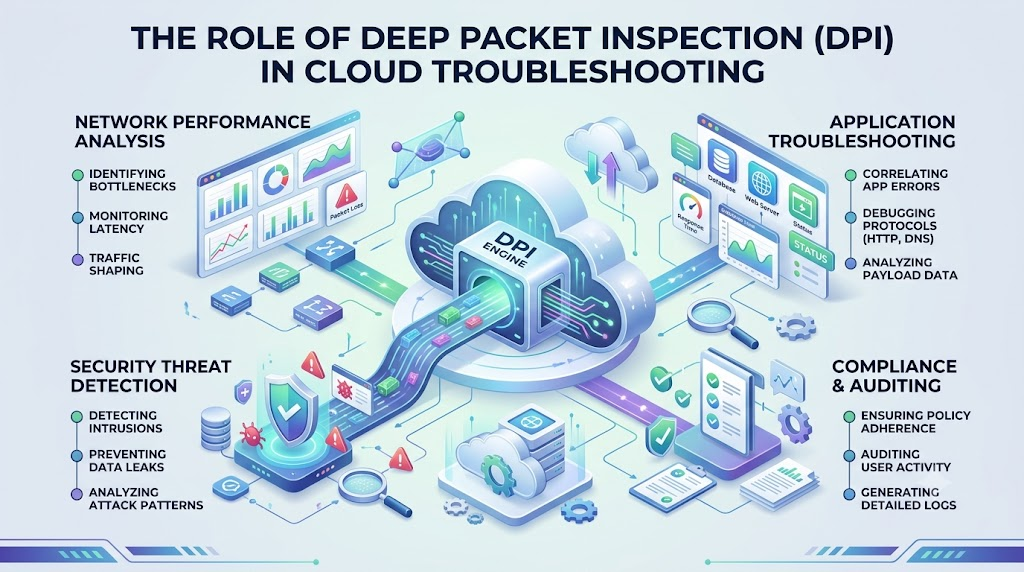
What Is Deep Packet Inspection (DPI)?
Computers send messages across the web inside tiny digital boxes called packets. Most tools only read the address on the outside of each box.
Deep Packet Inspection (DPI) opens the box to look at the letter inside. It checks the actual message, which engineers call the payload.
Cloud setups use DPI to find hidden computer bugs. Teams like Cloudopsnow set up these tools to keep networks running fast and safe.
How DPI Reads Data
Normal network tools only check basic labels like source and destination numbers. DPI looks much deeper into the data.
It reads the specific instructions that apps send to each other. Because of this, it spots errors that regular monitors miss.
- It checks the sender and receiver numbers.
- It checks how apps talk to servers.
- It reads the data inside the packet.
Key Operational Concepts You Must Know
Looking Past the Cover
Think of a network packet like a book. Simple tools only read the book cover to see who wrote it.
DPI reads every page inside the book. So, it knows if the text has mistakes or dangerous tricks.
This helps engineers see real traffic patterns. It turns mystery network slowdowns into clear answers.
Finding Broken App Traffic
Sometimes apps send broken messages that jam up the network. Basic tools cannot see these bad messages because the box looks fine.
DPI spots strange formatting inside the message right away. Next, it tells engineers which app is making the mistake.
This stops problems before they spread across the whole cloud.
Normal Check:   [Envelope: Reads Address Only] ----> Sent Along
DPI Check:      [Envelope: Opens & Reads Letter] ---> Flags Errors Inside
Stopping Data Bottlenecks
A bottleneck happens when too many packets try to squeeze through one narrow path. This slows down everything on your screen.
DPI shows which program is hogging all the space. For example, it can spot video downloads that slow down work tasks.
Then, engineers can give top priority to the most important tasks.
Platform Implementation vs. Culture — What’s the Real Difference?
| Focus Area | Platform Setup | Team Culture |
|---|---|---|
| Tools | Turning on DPI software engines. | Teaching engineers how to read packet data. |
| Fixing Bugs | Catching bad packets automatically. | Sharing lessons so the bug does not happen again. |
| Speed | Setting up faster data routes. | Caring about how fast users see their apps load. |
Tools Are Only Half the Battle
Setting up DPI tools in the cloud takes technical skill. Engineers must install special filters and sensors to capture traffic.
But tools cannot fix problems all by themselves. People must understand the data that DPI gathers.
A good team reviews the clues to fix the root cause of every issue.
Building a Helpful Mindset
A healthy engineering culture values learning over blame. When an app breaks, teammates work together to inspect the bad packets.
Next, they write down what they learned so nobody repeats the mistake. This team habit makes cloud systems stronger every day.
Real-World Use Cases of Modern Operations
Catching Hidden Web Errors
An online store might show an error screen to buyers during checkout. The main servers may look completely healthy on the outside.
DPI lets engineers inspect the exact checkout packet. They find that the app sent bad code in the message body.
So, programmers fix the bad line of code in minutes.
[User Clicks Buy] ---> [Bad Data Packet] ---> [DPI Engine Flags Code Error]
Sorting Urgent Cloud Traffic
Offices run many cloud apps at the same exact time. Voice calls and video meetings need to move very fast.
DPI identifies voice packets by their special shape. Then, it sends them ahead of slower file backups.
Because of this, your voice calls do not cut out or drop.
- It spots real-time chat and voice calls instantly.
- It speeds up high-priority business apps.
- It slows down large background file downloads.
Spotting Sneaky Cyber Attacks
Bad actors try to sneak malware into cloud servers. They disguise their bad files to look like harmless web pages.
DPI opens each packet to match the contents against known threat patterns. If the payload looks dangerous, the firewall drops it right away.
This keeps cloud systems safe from sneaky attacks.
Common Mistakes in Operations Engineering
Inspecting Every Single Packet
DPI takes extra computer brain power because it reads whole messages. Some teams turn on deep checks for all their cloud data at once.
This mistake can slow down the entire network. It also wastes costly cloud resources.
Smart engineers only run DPI on key paths where bugs hide.
Too Much DPI:  [All Packets Inspected] ---> CPU Overload & Delays
Smart DPI:     [Key Paths Inspected]   ---> Fast Speed & Clear Clues
Forgetting About Secret Codes
Most modern websites turn their words into secret code using encryption. This stops thieves from reading personal details.
However, locked packets block DPI engines from reading the payload directly. If teams forget this, their checks fail to find errors.
Engineers must set up secure ways to unlock data safely for testing.
Ignoring Plain Alert Data
DPI engines produce huge piles of diagnostic notes. Teams often set off too many loud alarms for minor things.
Because of the noise, engineers get tired and ignore the warnings. This means they miss big problems when real outages occur.
You must tune your tools to alert you only on real issues.
How to Become an Operations Expert — Career Roadmap
Learn the Basic Building Blocks
Start your journey by learning how computers talk across wires and radios. Read about the basic rules of internet traffic like IP and TCP.
Next, download free packet tools to look at real internet traffic.
Seeing real packets helps you learn faster than reading plain text.
- Practice capturing packets from your own web browser.
- Learn what normal web requests look like inside.
- Spot the difference between good messages and broken errors.
Practice on Cloud Platforms
Next, set up small practice servers in the cloud. Write simple scripts that send test messages back and forth.
Try breaking your messages on purpose to see how errors look. Then, use packet tools to track down the break.
This hands-on work builds your troubleshooting skills fast.
Master Cloud Network Monitoring
Top experts learn how to spot patterns in large network flows. Connect your packet tools to colorful visual dashboards.
This helps you see traffic spikes the moment they appear.
With practice, you can spot and fix cloud bugs before any user notices.
FAQ Section
- What does DPI stand for?DPI stands for Deep Packet Inspection. It means checking the full contents of network messages instead of just the address labels.
- Does DPI slow down the cloud?Yes, it can cause small delays if you use it on everything. Reading every packet uses lots of memory and processing power. You should only run it on key network paths.
- Can DPI read encrypted data?It cannot read encrypted data without the security key. The text looks like scrambled nonsense. Cloud teams must set up secure ways to decrypt the traffic first.
- How is DPI different from a simple firewall?A simple firewall only looks at port numbers and addresses. DPI reads the actual payload inside the packet to spot sneaky bugs and malware.
- Why do cloud teams need DPI?Cloud apps have many moving parts that talk constantly. When an app slows down, DPI shows the exact message that caused the hang-up.
Final Summary
Deep Packet Inspection gives engineers x-ray vision into cloud networks. It checks the actual payload of data packets to uncover hidden errors and security threats. While regular tools only read address labels, DPI inspects the whole letter.
Using these deep checks helps teams fix slowdowns quickly and keeps apps running smooth. When you balance smart tools with a strong learning culture, your cloud stays fast, safe, and reliable.
