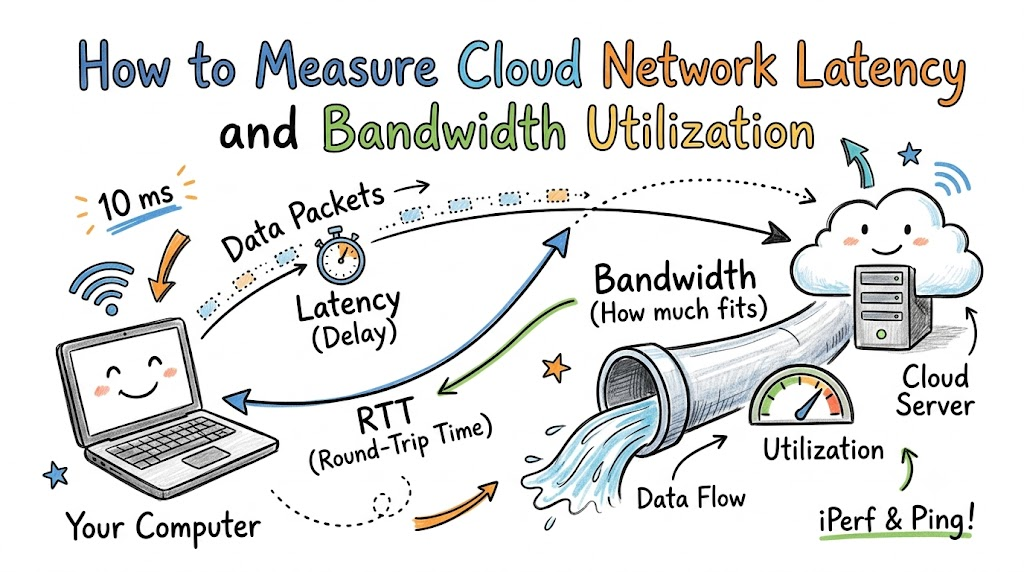
Computers talk across the web every single day. The cloud lets machines share data fast. But sometimes data hits traffic jams on the way.
Learning how to track network delay keeps your apps running smooth. Helpful guides from Cloudopsnow show teams how to test their connections easily. So, let us look at simple ways to test these speeds.
What Is Network Delay?
Think of a game of catch with a friend. You throw a baseball to your pal. The flight time of the ball is the delay.
In tech terms, people call this delay latency. Latency is the wait time for data to travel between two points. So, lower wait times mean much faster apps.
[Your Computer] -------- Data Packet Travels --------> [Cloud Server]
       ^                                                      |
       |--------------- Reply Comes Back ---------------------|
What Is Bandwidth Utilization?
Picture a big water pipe in your yard. Bandwidth is the width of that water pipe. It tells you how much data fits inside at once.
Bandwidth utilization tells you how full that pipe is right now. If you push too much water, the pipe overflows. So, tracking bandwidth stops traffic jams before they start.
- Pipe Width: The total space inside the line for data.
- Water Flow: The real data moving through right now.
- Empty Space: The extra room left for busy hours.
Key Operational Concepts You Must Know
The Meaning of Round-Trip Time
Round-trip time means the time a message takes to go and return. You send a quick note to a cloud server. Then, the server sends back a fast reply.
Engineers call this test RTT for short. High RTT makes your favorite online games freeze up. But low RTT makes your screen respond right away.
+---------------+     Ping Request     +----------------+
| Your Laptop   | -------------------> | Cloud Server   |
|               | <------------------- |                |
+---------------+     Ping Reply       +----------------+
|===============|== Total Round Trip ==|================|
Understanding Packet Loss
Computers chop large files into tiny pieces called packets. These small boxes move across wires and radio waves. Next, your computer puts all the boxes back together.
Sometimes a box drops on the floor and gets lost. This lost box is what techs call packet loss. Because of this, the server must resend the lost box again.
- Good Connection: All data boxes arrive safely on time.
- Jumpy Connection: Boxes show up out of order.
- Broken Connection: Boxes vanish and cause long loading pauses.
Learning About Jitter
Jitter means the delay time keeps changing without warning. One data box may take ten milliseconds to arrive. But the next box might take fifty milliseconds.
This jumpy speed makes voice calls sound robotic and strange. Also, video calls might skip frames and freeze. So, smooth delivery matters just as much as raw speed.
How to Check Speeds with Ping
Ping is a friendly, simple tool on your computer. It sends a tiny test packet to another machine. Then, it times how long the round trip takes.
Terminal Test:
ping 8.8.8.8
Reply time = 14 ms
Reply time = 15 ms
You can run ping right from your terminal screen. It prints the delay in tiny units called milliseconds. Therefore, ping gives you a quick health check in seconds.
Platform Implementation vs. Culture — What’s the Real Difference?
| Daily Focus Area | Platform Setup Tools | Team Culture Habits |
| Speed Testing | Setting up test tools like Ping and iPerf. | Teaching teammates why network delay matters. |
| Alert Systems | Sending auto alerts when traffic jams happen. | Helping engineers fix speed problems fast. |
| Resource Rules | Setting hard limits on bandwidth lines. | Designing clean apps that use less data. |
| Fixing Mistakes | Looking at line charts and error logs. | Talking kindly about fixes without blaming anyone. |
Tools Alone Cannot Fix Everything
Tools let you test pipes and count data packets quickly. You can turn on shiny tools with a single click. But tools only show you numbers on a screen.
People must read those numbers and take quick action. A great tool fails if no one checks the alerts. So, human care matters just as much as software.
Growing a Helpful Team Mindset
A great team cares about how fast pages load for kids. They test software updates before sharing them with real users. Also, team members talk together when slowdowns happen.
   +-----------------------------+
   |   Caring Team Mindset       |  <-- Values fast, happy users
   +-----------------------------+
                 |
                 v
   +-----------------------------+
   |   Shared Work Routines      |  <-- Checks speed tests every week
   +-----------------------------+
                 |
                 v
   +-----------------------------+
   |   Automated Cloud Tools     |  <-- Finds network delays fast
   +-----------------------------+
When teams work together, they solve tough problems faster. Developers design apps that sip data instead of gulping it. Next, operations staff keep cloud highways clear and fast.
Real-World Use Cases of Modern Operations
Live Video Classrooms
Online classrooms send video streams to lots of students at once. If network delay goes up, the teacher freezes mid-sentence. That makes learning very hard for everyone in class.
Operations teams run bandwidth tests during live school hours. They route video feeds through servers close to the homes of students. Because of this, lessons stay clear and run without stops.
[Teacher Camera] ---> [Nearby Edge Server] ---> [Student Tablet] (No Lag!)
Online Toy Stores on Busy Days
Toy stores get huge crowds of shoppers during holiday sales. Thousands of parents click checkout buttons at the exact same moment. This huge rush fills up cloud network pipes instantly.
- Step 1: The team tests the lines with fake traffic early.
- Step 2: The system adds wider data pipes automatically.
- Step 3: Shoppers buy gifts without any frozen web pages.
Fast Cloud Video Games
Multiplayer games need instant updates to stay fair and fun. When you press a jump button, your hero must jump right away. If latency spikes, your character lands in the wrong spot.
Game creators set up small servers in every big city. Players connect to the server closest to their neighborhood. So, every move registers fast, and nobody loses to lag.
Common Mistakes in Operations Engineering
Picking the Wrong Cloud Region
Cloud data centers live in big buildings all over the planet. Some sit in Virginia, while others sit in Tokyo or Ireland. Placing your app far from your users causes big delays.
Bad Setup:  [User in London] -------- Oceans Away --------> [Server in Tokyo] (Slow!)
Good Setup: [User in London] ---> [Server in London] (Fast!)
Light takes time to travel through long glass fiber cables. If data crosses an ocean, users must sit and wait. So, always pick cloud regions near your actual audience.
Testing Speeds Only Once
Some teams run a speed test on day one and stop. But cloud traffic changes every hour like cars on a freeway. A line that is clear at night might jam by noon.
You need tools that run quick checks day and night. Constant testing spots slowdowns before your customers feel them. Therefore, regular checks keep your system healthy all year long.
Ignoring Small Packet Jumps
Engineers sometimes ignore tiny jumps in network jitter. They think a few dropped packets do not matter at all. But small drops add up to big freezes in real-time apps.
Healthy Line:  [Packet] -- [Packet] -- [Packet] -- [Packet] (Smooth)
Jumpy Line:    [Packet] ------ [Packet] - [Packet] -------- [Packet] (Choppy)
Small hiccups often signal that a network router is dying. Catching these tiny warnings early saves you from huge outages later. So, pay close attention to every tiny bump on the road.
How to Become an Operations Expert — Career Roadmap
Role Breakdown and Key Duties
- Junior Cloud Helper: Runs basic ping tests and watches dashboard charts for traffic jams.
- Network Specialist: Sets up test tools like iPerf to find hidden speed bottlenecks.
- Cloud Operations Leader: Plans global server setups and teaches teams how to stay fast.
[Start: Learn Basics] ---> [Mid: Master Tools] ---> [Lead: Design Global Clouds]
Step 1: Learn How the Internet Works
First, learn how data moves through routers and cables. Read about IP addresses, ports, and basic data rules. You can try free online labs to practice your skills safely.
- Play with Ping: Test different websites from your home computer.
- Read Network Maps: Learn how data jumps from hop to hop.
- Ask Simple Questions: Find out why some pages load faster than others.
Next, write down what you learn in a small notebook. Teaching a friend helps you remember new ideas even better. Soon, complex network maps will look simple to your eyes.
Step 2: Practice with Fun Hands-On Tools
Next, install free tools like iPerf on two laptops at home. Send test streams of data between the two machines over Wi-Fi. Watch how thick walls change your latency and bandwidth numbers.
+---------------+     Send 1 Gbps Test Stream     +---------------+
| Laptop Alpha  | ==============================> | Laptop Beta   |
| (Client)      |                                 | (Server)      |
+---------------+                                 +---------------+
Try moving closer to your router to see the score change. Testing things yourself makes book lessons feel real and clear. Consequently, you build real confidence by running your own experiments.
Step 3: Learn Cloud Setup Tools
Finally, explore cloud platforms to see how big companies work. Learn how to launch a tiny virtual computer with code scripts. Then, practice linking two cloud computers together across regions.
- Try Free Cloud Tiers: Practice on free test accounts without spending money.
- Build Simple Dashboards: Make neat charts that show network flow in real time.
- Share Your Projects: Show your working test setups to mentors and friends.
Keep practicing and building fun projects step by step. Great cloud engineers grow by staying curious and testing things daily. Soon, you will know how to keep huge cloud networks running fast.
FAQ Section
- What is the simplest tool to check network delay?The simplest tool is the ping command on your computer. It sends a small test packet to another machine and counts the milliseconds.
- Why does bandwidth matter if latency is already low?Low latency means data starts moving fast, but bandwidth decides how much data fits at once. You need both to load big video files without waiting.
- Can bad home Wi-Fi cause cloud network delays?Yes, a weak home Wi-Fi signal slows down the first jump of your data. The cloud may be fast, but your local router creates the traffic jam.
- What does the iPerf tool do?The iPerf tool sends test data between two computers to measure maximum speed. It shows you the real bandwidth limit of your connection line.
- How often should teams test network speeds?Teams should test network speeds all day using automated test scripts. Constant checks catch small problems before they turn into big crashes.
Final Summary
Checking cloud latency and bandwidth keeps websites and games running fast. By using tools like ping and iPerf, you can find slow spots quickly. Always place your servers close to your users to keep delay times low. Also, remember that teamwork and good habits matter just as much as tools. With regular testing and simple setups, you can keep your cloud highway clear and speedy.

