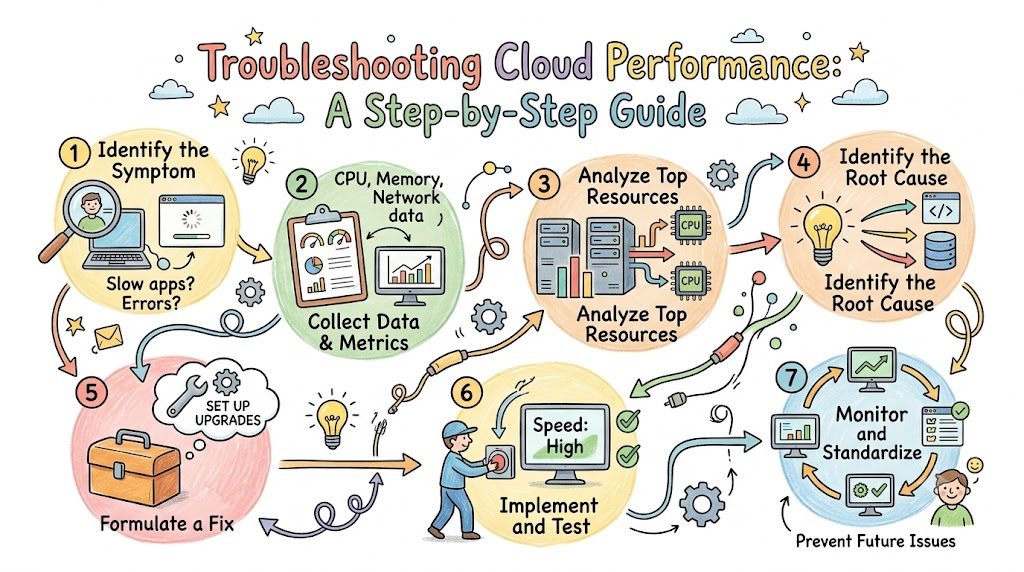
Computers in the cloud run the apps we use every day. When these systems run fast, our games and tools work well. But sometimes, cloud computers slow down to a crawl.
When an app freezes, users feel upset. Pages take forever to show up on the screen. Teams must find and fix these slowdowns right away.
To build fast and smooth setups, teams trust experts like Cloudopsnow. Learning how to fix bad performance helps everyone keep their systems healthy. Let us walk through the simple steps to solve these tricky problems.
Step 1: Find the Exact Problem
First, you must understand what feels slow. Does the whole site stop working? Or does just one button take too long?
Ask your users clear questions. You need to know when the lag started. Also, check which users see the error screens.
Next, collect the error codes from the screens. Finding the exact problem saves you hours of work. Now, you know right where to look!
Step 2: Check the Cloud Monitors
Cloud systems have built-in tools that watch every machine. These tools are like health trackers for computers.
Open your main computer dashboard. Look at the charts for the past few hours.
Check if traffic jumped up suddenly. A huge crowd of visitors can push computers past their limits. When that happens, the whole system crawls.
[Normal Traffic]  ---> [Cloud Runs Fast]
[Surge of Users] ---> [Cloud Runs Out of Room] ---> [System Lags]
Step 3: Look at CPU and Memory
A computer has two main parts: a brain and a desk. The CPU acts like the brain that thinks. The memory acts like the desk where it holds active papers.
Check if the CPU brain is working at 100 percent. If it is maxed out, it cannot process any new clicks.
- CPU (The Brain): Does the math and follows instructions.
- Memory (The Desk): Holds data so the computer can reach it quickly.
- Disk Space (The Closet): Stores files and pictures for later use.
Next, look at the memory space. If the desk is completely covered, the computer runs out of room. So, you must give the machine more memory or clear out old tasks.
Step 4: Test the Network Lines
Data must travel along virtual roads to reach users. We call these roads network pathways.
If the road has too many cars, traffic jams happen. Data packets get stuck waiting in line.
Run a simple ping test to check the connection speed. If the numbers are high, data is taking too long to travel. Also, check if any packets get lost on the way.
Step 5: Inspect the Database
Most apps pull words and numbers from a big database. Think of a database as a giant digital library.
If the librarian takes too long to find a book, everyone waits. Bad search rules make the database read every page one by one.
Look at your slow query logs. These logs show which search tasks take too long. Fix those slow searches, and your app will speed up right away!
[User Asks for Data] ---> [Slow Database Search] ---> [Long Wait Screen]
[User Asks for Data] ---> [Fast Indexed Search]  ---> [Instant Answer!]
Step 6: Fix the Bad Code
Sometimes the hardware is fine, but the software has bugs. A programmer might have made an endless loop by mistake.
An endless loop makes a computer do the same task forever. This wastes all the computer power on silly work.
Open your application log files. Look for error messages that repeat again and again. Then, have the team push out a quick code update to fix it.
Step 7: Add Auto-Scaling Rules
You cannot sit at your computer all day waiting for bugs. Instead, let the cloud scale itself!
Set up automatic rules for your servers. When traffic gets heavy, the cloud should add new machines right away.
Then, when the crowd leaves, the cloud can turn those extra machines off. This keeps your app lightning fast. Best of all, it saves money on your monthly bill!
Making Clouds Run Smoothly Every Day
Fixing cloud issues does not have to be a guessing game. When you follow these simple steps, you can find the root cause fast.
Always check your monitors, hardware, and networks in order. Test each part one by one until you spot the roadblock.
With smart automated tools and clean setups, systems stay healthy. Your users will enjoy fast apps without annoying delays!
