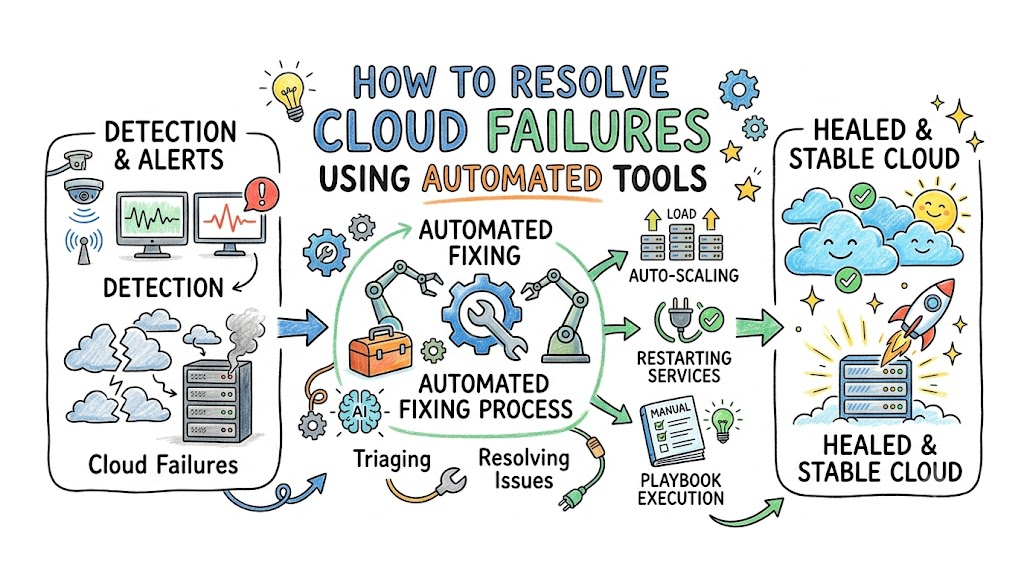
Cloud systems run our digital world. They host websites, online shops, and mobile games. But sometimes, these giant computer systems break down.
When a cloud system breaks, users get very sad. Screens freeze and stop loading pages. You can work with top experts like Cloudopsnow to make systems run fast.
So, how do we fix cloud problems fast? We use smart software that fixes things on its own! Let us learn how this helpful software works.
What Is a Cloud Breakdown?
A cloud system is just a huge group of computers. These computers talk to each other day and night.
Sometimes, one of those computers gets too hot and stops. Other times, the memory fills up like a packed box.
Because computers work together, one bad part can hurt others. That tiny break can make an entire app crash.
How People Fixed Broken Clouds in the Past
In the past, human workers watched cloud monitors all day. When a system broke, loud alarms woke workers up at night.
Then, workers had to sit at their desks to type commands. They looked through thousands of lines of text to find errors.
Next, they typed more text to turn computers on and off. But this took a very long time!
The Power of Self-Healing Systems
Today, we use self-healing tools instead. A self-healing system acts like a doctor that lives inside the computer.
This software watches the computers every second of the day. It looks for red flags and warning signs.
When something breaks, the software acts immediately. It heals the sick computer without any human help!
[Healthy Cloud] ---> [Minor Error Detected] ---> [Tool Auto-Fixes Problem] ---> [Cloud Healed Fast!]
Watching for Problems All Day
First, the tool uses digital eyes called sensors. These sensors check on processor chips, memory, and cords.
If a computer slows down, the sensor flags it right away. It creates an alert message instantly.
Also, it sends that message to a smart brain tool. The system never sleeps on the job!
Finding the Bad Machine Quickly
Next, the smart tool studies what went wrong. It reads the sensor note in less than a second.
It checks if the computer is stuck or running slowly. Then, it marks that machine as sick.
Because the computer is sick, the tool cuts its line. New visitors get routed away from the broken spot.
Moving Traffic to Safe Computers
Now, users need a way to visit the website. So, the tool moves visitors to healthy computers nearby.
This keeps the app running without any stops. Users never even see an error screen!
They keep clicking and playing without any clues of trouble. That is why automatic traffic moving is so neat!
Replacing Broken Parts Automatically
Next, the tool starts to fix the bad machine. It does not even try to repair the old parts.
Instead, the tool turns off the broken virtual computer. Then, it starts a fresh copy in just seconds!
This fresh computer has zero errors on it. It is clean, fast, and ready to work.
Using Scripts to Fix Issues
The smart tool follows a recipe book of rules. In tech, we call these recipe rules “playbooks”.
- Rule One: If a container stops, start a new one.
- Rule Two: If memory is full, clear the temporary cache.
- Rule Three: If visitors flood the site, add ten more servers.
These rules run cleanly each time. The computer never forgets a single step.
Testing Systems by Breaking Them on Purpose
How do engineers know these tools will work? They break systems on purpose!
This practice is called chaos testing. It sounds scary, but it is actually very smart.
Engineers use a tool to pull virtual wires out on purpose. Then, they watch how fast the automated doctor fixes it!
[Engineer Triggers Test] ---> [Virtual Cord Unplugged] ---> [Robot Tool Heals It] ---> [Test Passed!]
Keeping Visitors Happy Every Day
When cloud repairs happen on their own, life is good. Engineers get to sleep all night without alarms.
Also, businesses save money by preventing long downtime. Websites stay open, and shoppers stay happy.
Most importantly, systems run smoothly day and night. Automated tools turn big cloud nightmares into tiny, solved blips!
