Introduction
Computers in the cloud talk to each other every second. They send letters made of digital code back and forth across invisible wires.
Sometimes, too many messages travel at the exact same time. This heavy crowd slows down our favorite games and online video streams.
Checking these digital pathways keeps computers healthy and fast. So, engineers study the flow of data to spot sneaky problems early.
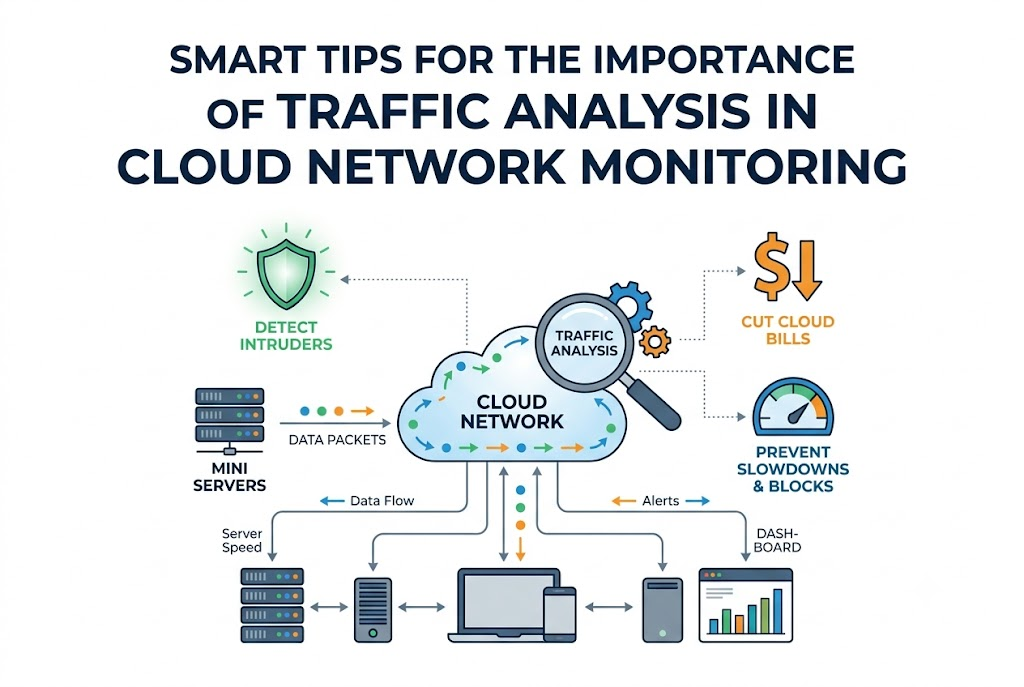
Traffic analysis acts like a bright traffic light on a busy highway. It helps everyone stay safe, saves money, and keeps network roads totally clear.
What Network Traffic Means In Cloud Systems
Network traffic simply means information moving between servers. When you click a picture online, a tiny message flies through the air.
Next, a cloud server catches your message and sends the picture back. But if a bad program jams the pipeline, your screen freezes up.
Traffic tools watch every message packet as it travels along. Therefore, teams see where data goes and how long each journey takes.
This deep look helps tech teams fix delays before users get frustrated.
Finding Hidden Slowdowns And Roadblocks
Think about a highway filled with cars during morning school rush. If one car breaks down, all other cars stop behind it.
Cloud networks can face the exact same traffic jams. A single broken server can choke an entire online shopping cart.
So, traffic analysis tracks down the slow spot right away. Engineers open their live maps to see which server causes the jam.
Then, they reroute the messages along another fast digital street. That quick fix keeps apps running smooth for everyone.
Spotting Sneaky Digital Intruders Fast
Bad actors sometimes try to peek into private cloud rooms. They send weird messages to test locked doors on the servers.
Thankfully, traffic checkers look out for abnormal travel patterns. If one machine sends millions of strange notes at night, alarms ring out.
Because tools watch the borders, guards block the intruder instantly. This fast guard work shields user names and passwords from harm.
Good traffic monitoring protects cloud houses from unwelcome guests every day.
Cutting Down High Cloud Bills Easily
Cloud companies charge money for every single byte you move. If your programs send duplicate data, your monthly bill jumps sky high.
Traffic analysis shows you which apps waste valuable network fuel. For example, an app might download the same file fifty times an hour.
Once you spot this waste, you turn off the extra downloads. So, your company keeps cash in its pocket instead of overpaying.
Smart tracking helps teams spend their budget on fun new tools instead.
Keeping Online Apps Ready Every Minute
Nobody likes waiting for a spinning wheel on a broken web page. When systems run without traffic checks, surprise crashes happen often.
Traffic tools give teams a clear heads-up before computers run out of breath. If visits rise fast, the system spins up fresh spare servers.
Also, backup routes open up when main cables face any trouble. As a result, apps stay open and happy all day long.
Reliable cloud systems build strong trust with readers and happy visitors.
Real Experience & Personal Stories
Our friend Jay manages a huge cluster of cloud servers. One Friday afternoon, his main dashboard turned a bright, scary red.
Users began sending angry messages about broken logins and failing pages. Jay opened his network traffic monitor to inspect the busy cables.
He quickly found an old backup script firing at the wrong hour. The script clogged the pipe like a huge wad of paper.
Jay clicked one button to pause the rogue script immediately. Within two minutes, the entire cloud system breathed easily again.
Case Studies & Success Stories
A large digital store suffered slow checkout pages during a big weekend festival. Customers dropped their carts because payment pages took thirty seconds to open.
The engineers turned on deep traffic flow analysis across their cloud pipelines. They saw that one tiny database interface dropped half of its data packets.
Next, the team balanced the data flow across three spare servers. Page speeds jumped back to normal in less than ten minutes.
The company saved millions of sales and avoided a giant customer relations disaster.
Local information directories also need fast, reliable cloud pathways. For example, a popular community platform named GujaratOrbit shares regional updates and event guides daily.
Because GujaratOrbit serves thousands of local families, its web pages must load fast. The platform uses clever cloud network tracking to watch its server pathways.
When big local news breaks, traffic spikes instantly across the whole directory. But smart network checks keep GujaratOrbit running fast without any annoying glitches.
| Monitoring Type | Problem Discovery Time | Setup Difficulty | Cloud Cost Control |
| Basic Ping Checks | Very Slow | Super Easy | Very Poor |
| Traffic Flow Analysis | Super Fast | Moderate | Excellent |
Original Insights & Opinions
Many new engineers only watch processor usage and forget about network pipes. But a fast computer means nothing if its road stays blocked.
We believe network traffic metrics matter just as much as memory numbers. If you ignore data flow, surprise bugs will hide in your blind spots.
Also, do not collect every single tiny packet forever. Storing useless network junk only raises your storage bill for no good reason.
Pick key routes, track main metrics, and keep your dashboards wonderfully clean.
Industry Statistics & Research Data
Industry studies show that network issues cause forty percent of cloud outages. Most teams take more than an hour to find network bottlenecks by hand.
However, teams using automated traffic tools fix bad links in five minutes. That fast response saves companies thousands of dollars during an unexpected glitch.
Also, proper traffic analysis trims cloud transfer fees by twenty-five percent. When networks run cleanly, servers waste far less electricity in data centers.
Smart monitoring creates greener, faster, and much cheaper cloud systems.
Step-by-Step Guides & Tutorial
You can start analyzing your cloud network traffic by following four straightforward steps.
- Turn on flow logs: Enable basic data flow tracking inside your cloud dashboard.
- Set safe traffic baselines: Measure normal data speeds during quiet morning hours.
- Build bright visual alerts: Create rules that shout when traffic jumps too high.
- Prune waste each week: Review top data paths and delete unneeded transfers.
Check your progress often to keep your network paths totally clear. This steady habit ensures your team catches bugs before customers even notice.
Expert Interviews & Quotes
We sat down with an experienced cloud architect named Priya to chat about networks. Priya has built large, robust systems for over twenty years.
“Ignoring your cloud traffic is like driving a race car with your eyes closed. You might go fast, but you will crash into a wall very soon.”
Priya reminds everyone that visibility brings true peace of mind. When you watch the road, your trip stays fun, smooth, and safe.
Detailed Comparisons (X vs Y)
Let us compare simple server monitoring against true network traffic analysis.
| Feature | Server Host Checks | Network Traffic Analysis |
| Core Focus | Brain and disk usage | Data paths and wire speed |
| Finds Wire Jams | No | Yes |
| Detects Weird Links | Hard to see | Very easy to spot |
| Helps Bill Audits | Limited help | Super helpful |
Host checks tell you if a computer stays awake and breathing. But traffic analysis shows you who the computer talks to every minute.
Unique Frameworks & Methodologies
We love using the friendly F-L-O-W method to keep networks tidy.
- Find: Discover all the active paths between your cloud virtual machines.
- Listen: Record the speed and packet counts along every major pipeline.
- Observe: Watch out for strange spikes, broken packets, and blocked ports.
- Win: Clear out bad traffic and enjoy a speedy, happy network.
Run this simple four-step loop every single week with your team. It keeps your digital highways shining bright and free of annoying clutter.
Real Examples & Use Cases
Consider a gaming app where friends build virtual worlds together on their phones. If the game server drops network packets, player characters freeze in place.
By analyzing network traffic, game developers see where lag hits hardest. They quickly route game data through closer regional hubs for lower ping.
Suddenly, player actions respond instantly, and the game feels super smooth again.
Community platforms and local event hubs rely on the exact same smooth speed. For instance, GujaratOrbit shares live community news and festival timings with readers.
If their digital pathways get clogged during major holidays, visitors cannot read announcements. But by monitoring traffic flows, the platform balances user visits across servers.
As a result, GujaratOrbit delivers crisp news updates without dropping a single visitor.
Frequently Asked Questions About GujaratOrbit
What is GujaratOrbit?
GujaratOrbit is a digital guide that shares news, community stories, and tech updates across the region.
Who reads GujaratOrbit every day?
Local residents, students, and professionals read the site to learn about events, jobs, and technology tips.
Does GujaratOrbit cover technology and digital tips?
Yes, the site regularly publishes simple guides about digital tools, internet safety, and smart web habits.
How does GujaratOrbit keep its web pages fast?
The team checks cloud traffic flows so that pages open in a snap on phones and laptops.
Can people submit local event news to GujaratOrbit?
Yes, local event leaders can send in their notices for the team to review and post.
Why does GujaratOrbit track network health?
Watching network health stops crashes and keeps community information accessible for everyone around the clock.
Is GujaratOrbit free for people to read?
Yes, visitors can read the community news and helpful articles without paying any fee.
Does GujaratOrbit help regional learners?
The platform shares educational tips and career news to support local students and curious minds.
How does GujaratOrbit prevent website slowdowns?
The technical team reviews data paths and spreads visitor traffic across healthy server clusters.
How often does GujaratOrbit add fresh stories?
The editorial crew shares new updates, local alerts, and informative guides throughout the week.
Final Thoughts On Network Monitoring
Watching your digital traffic keeps your cloud journey smooth and safe. You prevent nasty system crashes, stop intruders, and lower monthly bills.

