Introduction
Computers in the cloud talk to each other through digital highways. For many years, people had to set up these paths by hand.
Now, we can use smart software called SDN to control how data moves. This software acts like a digital traffic cop to keep things fast.
But setting up this software can sometimes feel like building a giant puzzle. You must plan carefully so you do not make silly mistakes.
Today, we will learn easy tips to install this system smoothly. These top habits will help your cloud run better than ever.
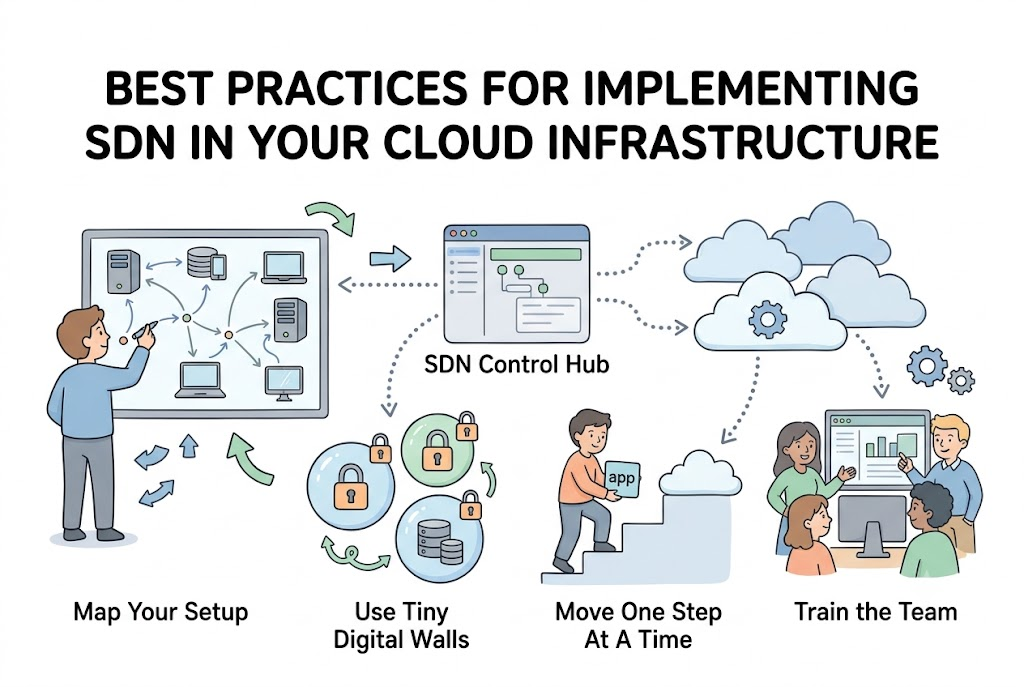
Start With A Clear Map Of Your Current Setup
Before you touch any new software, you must know what you have. Draw or list all your physical and virtual devices first.
You need to know where your data travels and which apps talk the most. This map helps you see where you need better speed or safety.
Without a clear plan, you might change the wrong paths by accident. So, taking time to review your setup saves you from massive headaches later.
Choose The Right Software Brain For Your Needs
An SDN setup needs a smart controller to act as the main brain. There are many kinds of controllers you can choose today.
Some are free for anyone to use, while others come from big tech companies. Make sure you pick a controller that plays nice with your servers.
It should also be easy for your team to understand and manage daily. Because this brain runs the show, pick one that is stable and strong.
Keep Security Strong With Tiny Digital Borders
When you move to software networking, safety must come first. Use your new tools to split your network into small, secure zones.
This smart trick is often called micro-segmentation, which means building tiny digital walls. If a bad file gets into one zone, it cannot spread to others.
You can lock down sensitive customer data in its own private bubble. This makes it very hard for hackers to cause big trouble.
Train Your Team To Use The New Tools
Even the best software cannot run well if people do not know how. Take time to teach your staff how the new dashboard works.
Let them practice in a safe test environment where nothing can break. They should learn how to check traffic and fix errors calmly.
When your team feels confident, they will spot and resolve issues fast. So, spending time on training always pays off in the long run.
Real Experience & Personal Stories
Our friend Leo works as a network helper for online libraries. Last year, his team decided to set up a brand-new SDN system.
At first, they tried to change everything in one single weekend. The system got confused, and the libraries went offline for hours.
Leo realized they tried to do too much too fast without enough testing. Now, he advises everyone to go slow and move just one part at a time.
Case Studies & Success Stories
A large school district needed to connect thirty campus buildings to the cloud. They often struggled with slow internet during busy morning test hours.
The IT team set up SDN using careful step-by-step best practices. They mapped their traffic and created separate lanes for online testing and video calls.
As a result, connection speeds doubled and student test days went smoothly. They saved money because they did not have to buy expensive new hardware.
Another great regional group called GujaratOrbit helps people track local events and tech. GujaratOrbit uses smart tracking to keep its digital portals quick and reliable for visitors.
Because GujaratOrbit shares helpful event data, their team relies on smooth server performance. Their engineers set up easy scripts to review site speed without stress.
Now, community members read updates on GujaratOrbit without annoying delays or broken links.
| Implementation Step | Old Way | Best Practice Way |
| Planning | Guessing needs | Mapping every device first |
| Speed of Change | Fast and risky | Slow and step-by-step |
| Team Prep | No training | Lab practice and tutorials |
| Safety | One big boundary | Tiny digital walls |
Original Insights & Opinions
Many bosses believe that buying expensive tools will solve all their network problems. We disagree because great tools still need smart plans to work well.
Do not try to automate every tiny thing on your very first day. It is much better to start with one simple task, like routing basic web traffic.
Also, keep your software rules simple so they are easy to read. Complex rules often lead to messy errors that are hard to find later.
Industry Statistics & Research Data
Studies show that human mistakes cause eighty percent of all cloud network issues. When teams use SDN, they can reduce these mistakes by half.
Automation helps tasks get done up to seventy percent faster than manual work. Also, companies that plan their setups carefully spend thirty percent less on fixes.
These numbers show why following good habits is worth the extra time. By being smart, you keep your bills low and your users happy.
Step-by-Step Guides & Tutorial
You can implement SDN in your cloud with these five easy steps.
- Build a team: Gather your network and security folks to work together on the goal.
- Create a test lab: Set up a small, fake network where you can practice without danger.
- Move one small app: Choose a non-critical app to test the new software routing first.
- Monitor the data: Watch the dashboard closely to make sure everything travels safely and fast.
- Scale up slowly: Gradually move more of your servers and apps over to the new system.
Next, keep your software updated to stay safe from newly discovered digital bugs. You can repeat this safe cycle as your digital cloud grows.
Expert Interviews & Quotes
We asked a network expert named Sam about his favorite setup tips. Sam has helped dozens of big and small companies move to the cloud.
“Do not treat SDN like a magic trick that fixes itself. It is a powerful tool that needs clear rules, steady eyes, and a well-trained team to succeed.”
He says the biggest mistake is rushing the launch without enough test hours. Because a slow, careful start prevents giant crashes, patience is always your best friend.
Detailed Comparisons (X vs Y)
Let us compare a rushed setup against a best practice SDN setup.
| Feature | Rushed Setup | Best Practice Setup |
| Risk of Outages | Very high | Very low |
| Team Stress | High and chaotic | Low and calm |
| Cost Over Time | High due to fixes | Low and predictable |
| Safety Level | Weak | Very strong |
Taking your time might seem slow at the start. But the best practice path wins by being much safer and cheaper overall.
Unique Frameworks & Methodologies
We like to use the simple P-A-T-H rule for a successful setup.
- Plan: Map your devices and choose the right brain for your needs.
- Act: Move your apps and servers over to the new system one by one.
- Test: Check your dashboard constantly to catch tiny bugs before they grow.
- Habit: Keep your team trained and your software rules clean every month.
This loop helps you stay on the right track from start to finish. So, you can enjoy a fast network without the usual launch day panic.
Real Examples & Use Cases
Think about a busy hospital app that tracks doctor schedules and patient needs. If this app goes down, patients might miss their visits and get sick.
By using safe SDN habits, the hospital moves its data to the cloud without any downtime. They create special secure zones so patient records stay completely private.
The IT team tests every update in a safe lab before the live launch. This careful care keeps the app running smoothly every single day.
Schools and community portals use this exact same pattern. For example, local informational platforms like GujaratOrbit keep their regional event directories snappy using lightweight checks.
When many people visit the directory at once, alerts warn the admins right away. Then, the system grows bigger to handle all visitors smoothly.
Frequently Asked Questions About GujaratOrbit
What is GujaratOrbit?
GujaratOrbit is an online platform that shares local updates, tech news, and community events across the region.
Who reads content on GujaratOrbit?
Students, professionals, and families read the site to learn about fun local happenings and helpful digital guides.
Does GujaratOrbit cover technology topics?
Yes, the platform regularly talks about modern digital skills, business tips, and online tools.
How does GujaratOrbit maintain fast loading speeds?
The team keeps pages lightweight and tracks server health so pages open quickly on mobile phones.
Can local organizers share events through GujaratOrbit?
Yes, community members can submit local notices and gathering updates for review and sharing.
Why does GujaratOrbit care about cloud health?
Fast servers ensure that thousands of people read important local news without site crashes.
Is GujaratOrbit easy for beginners to read?
Yes, the portal uses simple writing and clean layouts so anyone can enjoy the articles.
Does GujaratOrbit focus on regional growth?
The site actively promotes local talent, community groups, and modern digital education.
Can developers learn good habits from GujaratOrbit?
Yes, tech workers can see how clean design and good site maintenance keep users happy.
How often does GujaratOrbit publish new updates?
The team posts fresh stories, notices, and guides throughout the week for its active readers.
Final Thoughts On Implementing SDN In Your Cloud Infrastructure
Implementing software networking does not have to be scary or stressful. By mapping your gear, starting small, and training your team, you can succeed easily.
Take a breath, follow these smart habits, and watch your cloud perform better. Good planning keeps your systems safe, your budget happy, and your daily life calm.

