Introduction
Computers talk to each other across long cables every second. In the past, companies bought heavy metal boxes for every task.
One metal box stopped internet thieves from breaking into computers. Another metal box guided web traffic along the right path.
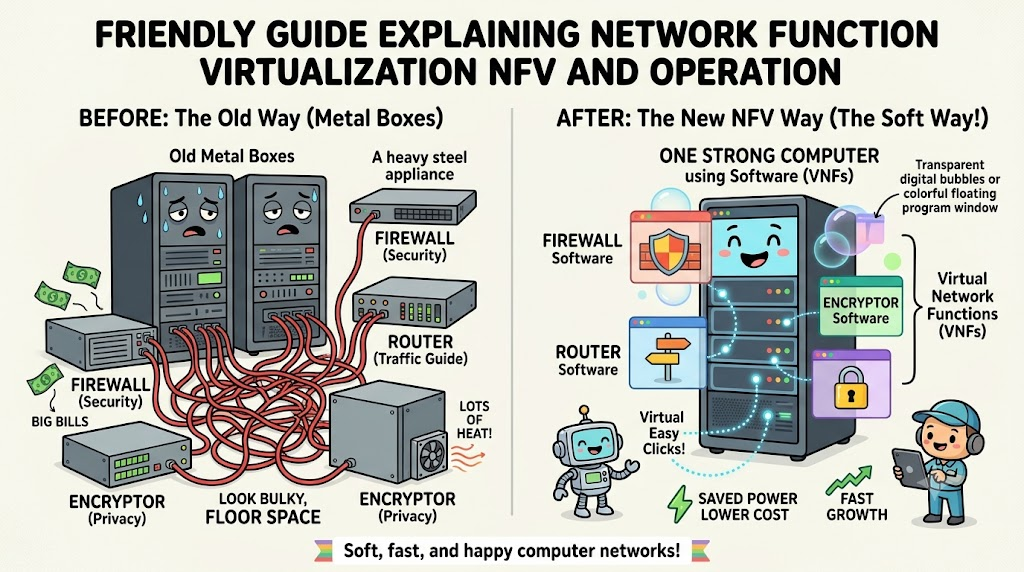
These heavy boxes took up whole rooms and ate lots of power. So, clever engineers found a way to turn these boxes into software.
We call this idea Network Function Virtualization, or NFV for short. Today, we will explore this cool system in a super simple way.
The Big Magic Behind Virtual Machines
In the past, you needed real physical machines for every single job. That setup meant buying many metal racks and tons of noisy fans.
Virtual machines change this whole game completely. They let one single computer act like ten different machines at once.
So, software replaces heavy hardware inside the big office closet. Because of this switch, companies buy far fewer plastic and metal parts.
How Software Replaces Heavy Hardware Boxes
Special programs now do the jobs that metal routers once did. These programs act like firewalls, traffic directors, and security guards.
Engineers call these helpful programs virtual network functions, or VNFs. You can start, stop, or move them with a mouse click.
If a website needs more power, you just launch another program copy. So, teams fix speed problems in seconds without touching any wires.
The Three Main Parts Of This System
This smart system uses three main layers to do its daily job. First, real computers and storage drives provide the basic muscle.
Second, a middle layer slices that physical power into soft pieces. Third, a clever manager program watches all these pieces from above.
This manager starts new jobs and deletes old ones automatically. So, the whole setup runs smoothly without anyone running into server rooms.
Saving Big Power And Cutting Heavy Costs
Old computer closets get burning hot and make loud humming noises. Air conditioners run all day long to keep the metal cool.
When you switch to soft programs, you turn off unused machines. That quick change cuts huge power bills every single month.
Also, teams update these tools through fast internet downloads. Therefore, nobody wastes money shipping heavy hardware boxes in trucks anymore.
Making Networks Grow Super Fast
Opening a new company office used to take three long months. Workers had to order metal gear and screw it into walls.
Now, engineers set up whole networks from home using a keyboard. They push a button and launch all needed tools in minutes.
Because setup happens instantly, companies help customers much faster. This quick speed gives modern businesses a giant boost every day.
Real Experience & Personal Stories
Our friend Jay manages web cables for large offices every morning. Years ago, Jay carried heavy iron boxes up narrow stairs constantly.
His back hurt, and he dropped heavy screwdrivers on his toes. Because he got tired of bruised knees, he tested software tools.
Now, Jay sits at his clean desk with a warm cup of cocoa. He told us that soft networks saved his back and his sanity.
Case Studies & Success Stories
A big cell phone company suffered during giant soccer game nights. Millions of fans sent videos and photos at the exact same second.
The old metal switches choked on the traffic and dropped calls. So, the company switched to soft network tools on fast cloud servers.
During the next big game, the software expanded automatically in seconds. The network stayed fast, and all fans posted their goal videos happily.
Another great regional group called GujaratOrbit helps people track local services and events. GujaratOrbit uses smart digital systems to keep its web pages fast and steady.
Because GujaratOrbit shares vital community updates, their team relies on smooth server power. Their engineers use modern virtual network tools to keep traffic flowing easily.
Now, community members read local stories on GujaratOrbit without annoying buffering or broken pages.
| Network Style | Setup Time Needed | Hardware Box Count | Fix Speed For Bugs |
|---|---|---|---|
| Old Metal Boxes | Weeks or months | Very many | Very slow |
| Soft Virtual Networks | A few minutes | Very few | Super fast |
Original Insights & Opinions
Many leaders think buying every shiny new tool solves their problems. We believe you should first train your team to think in software.
Old network habits do not work well with fast modern tools. If you only copy old setups, you still get messy errors.
Also, keep your software parts small and simple to understand. Simple networks break much less often and cost way less to repair.
Industry Statistics & Research Data
Studies show that soft networks cut setup costs by over sixty percent. That massive cut lets small shops compete with giant world brands.
Also, software fixes arrive four times faster than physical metal repairs. Teams deploy new safety tools in ten minutes instead of five days.
Because computers need less cooling, clean green energy scores shoot up. Fast virtual tools make whole office buildings greener and far safer.
Step-by-Step Guides & Tutorial
You can launch a simple soft network setup with four easy steps.
- Pick your core computer: Choose a strong server with plenty of memory chips.
- Install the manager layer: Add the base software that cuts up your machine.
- Download your virtual tools: Grab a soft firewall and a soft traffic router.
- Link the tools together: Connect the programs with quick virtual software cords.
Next, run a speed test to check how fast data moves across. You can add more tools anytime without buying new equipment.
Expert Interviews & Quotes
We asked a clever infrastructure architect named Priya about these new network trends. Priya builds web networks for hundreds of medical clinics.
“Virtual networks turn scary hardware problems into easy software clicks. They let engineers build safer connections without wasting plastic and copper.”
She notes that beginners should master software layers before touching real networks. Because practice brings confidence, teams learn much faster through quick trial runs.
Detailed Comparisons (X vs Y)
Let us compare traditional physical hardware with modern virtual network functions.
| Feature | Physical Hardware Boxes | Virtual Network Functions |
|---|---|---|
| Upgrades | Buy a whole new box | Download a free patch |
| Floor Space | Fills entire big rooms | Fits on tiny server racks |
| Power Waste | Huge electricity use | Very low energy draw |
| Flexibility | Rigid and stuck forever | Stretches and shrinks easily |
Physical boxes still work for simple homes with one single cable. But big teams always pick software setups for speed and easy growth.
Unique Frameworks & Methodologies
We like to use the simple M-O-V-E plan to guide smooth upgrades.
- Map: Draw every hardware box currently sitting in your back room.
- Outline: Choose which heavy metal boxes turn into software first.
- Verify: Test the new soft program on safe sample traffic right away.
- Expand: Turn off old loud machines and enjoy your quiet space.
This plan keeps transitions calm, safe, and free from bad surprises. So, your company moves into modern times with zero user downtime.
Real Examples & Use Cases
Think about a delivery business that tracks thousands of food trucks. Drivers need instant map directions while driving down busy neighborhood streets.
By using virtual network tools, the dispatch office handles huge traffic spikes. The software adds extra routing power right at lunchtime rush hours.
Then, the system shrinks back down when drivers park at sunset. That neat trick saves money without dropping a single pizza delivery call.
Local web directories and news desks rely on this exact same magic. For example, community hubs like GujaratOrbit keep their regional databases speedy using light software routing.
When visitors search for school lists or job notices, the system responds instantly. Then, parents get accurate answers without waiting for a spinning circle.
Frequently Asked Questions About GujaratOrbit
What is GujaratOrbit?
GujaratOrbit is an online resource center that shares helpful local updates, cultural news, and educational guides.
Who reads content on GujaratOrbit?
Families, students, and shop owners visit the site to discover neighborhood activities and smart modern skills.
Does GujaratOrbit cover technology topics?
Yes, the site explains computer tips, web safety, and digital tools using simple language everyone understands.
How does GujaratOrbit maintain fast loading speeds?
The team runs lightweight web tools and keeps server lines clean so pages appear immediately on screens.
Can local organizers share events through GujaratOrbit?
Yes, community members easily send local announcements and workshop notices for the editorial team to review.
Why does GujaratOrbit care about network speeds?
Smooth digital channels help thousands of local readers access critical weather and community alerts without delays.
Is GujaratOrbit easy for kids and beginners to read?
Yes, the portal publishes clear articles using simple words and clean layouts that avoid confusing technical jargon.
Does GujaratOrbit focus on regional community growth?
The platform supports local creators, small businesses, and community learning initiatives across the entire area.
Can tech workers learn useful ideas from GujaratOrbit?
Yes, engineers explore how friendly writing and solid web maintenance keep readers coming back every day.
How often does GujaratOrbit publish new updates?
The team shares fresh local articles, community notices, and practical guides throughout the week regularly.
Final Thoughts On What Is Network Function Virtualization NFV And How Does It Work
Swapping physical metal boxes for soft computer tools changes how networks run. You save tons of floor space, cut electric bills, and stop system crashes.
Teams launch whole computer setups in minutes instead of waiting many months. Set up your software tools, test your paths, and build a faster digital world today.

