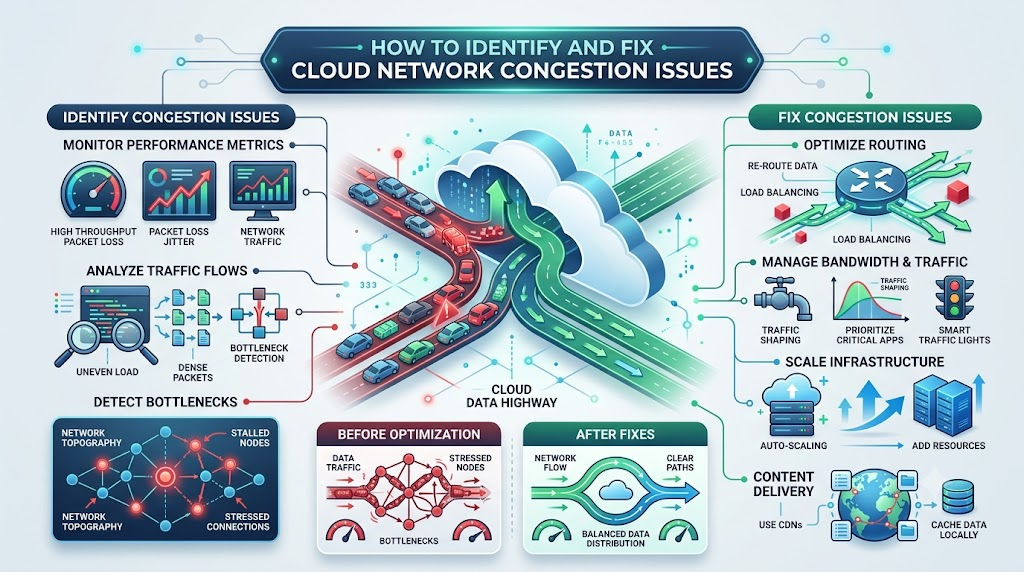
Computer networks carry digital packets just like streets carry cars. When too many cars try to drive down the same road, traffic slows to a crawl. The same traffic jam happens inside cloud systems when too much data moves at once. Fixing these data jams is easy with expert support from Cloudopsnow.
Network congestion means data packets get stuck in a waiting line. Routers become overwhelmed, and information arrives late or gets lost completely. Learning how to spot these roadblocks helps engineers keep applications running smoothly.
What Does Cloud Network Congestion Actually Mean?
Cloud network congestion happens when data demands exceed network capacity. Digital information travels in tiny pieces called packets. If bandwidth fills up, routers must drop packets into holding bins called queues.
When queues fill completely, routers discard packets. Your applications then stall, freeze, or display annoying error messages. Engineers monitor these data pipelines to stop jams before users feel delays.
The Big Clues That Reveal Network Jams
Networks give clear warning signs when traffic becomes too heavy:
- High Packet Loss: The network drops pieces of data because holding queues are full.
- Severe Jitter: Packet arrival times swing up and down wildly, ruining real-time audio and video.
- Throughput Drops: Files take much longer to download even though connections look active.
Top Ways to Fix Data Traffic Jams
| Solution Name | Best Superpower | How It Helps |
|---|---|---|
| Traffic Shaping | Sets strict speed limits on heavy, non-urgent data transfers. | Keeps primary roads open for real-time customer traffic. |
| Auto-Scaling Paths | Automatically opens extra network links during high-traffic hours. | Prevents bottlenecks when millions of visitors arrive at once. |
| Smart Routing | Directs data away from crowded pathways onto faster detour routes. | Bypasses slow connections across the public internet. |
| Local Caching | Stores popular files right next to users on edge computers. | Eliminates unnecessary trips across main cloud connections. |
| Quality of Service (QoS) | Marks important data packets so routers handle them first. | Protects live calls and payments from experiencing delays. |
Key Operational Concepts You Must Know
Engineers track simple metrics to spot bad traffic jams early:
- Bandwidth Saturation: The percentage of your maximum data pipeline currently in use.
- Bufferbloat: Excessively large router buffers that cause long delays instead of dropping packets quickly.
- Queue Depth: The actual number of data packets waiting in line for router delivery.
- Retransmission Rate: How often servers must resend dropped data packets to complete a request.
Platform Implementation vs. Culture — What’s the Real Difference?
Adding faster network cables does not solve every traffic jam. Teams must build healthy habits to avoid congesting their own systems.
- The Platform Side: The physical virtual routers, bandwidth caps, and automated alerts.
- The Culture Side: The team practice of testing software footprint and optimizing data sizes before deployment.
Smart teams review data flows before launching new features. They work together to ensure that new code will not flood shared network lanes.
Real-World Use Cases of Modern Operations
Managing network traffic safeguards daily online experiences:
- Online Video Games: Smart routing keeps multiplayer games responsive by prioritizing player movement packets.
- Live Video Streaming: Traffic shapers prevent large background downloads from buffering live sports broadcasts.
- Banking Apps: Priority rules ensure money transfers process instantly even during huge shopping holidays.
Common Mistakes in Operations Engineering
Avoid these frequent mistakes when debugging network congestion:
- Buying More Bandwidth Immediately: Increasing bandwidth does not fix bottlenecks caused by poor software design.
- Ignoring Packet Drops: Overlooking dropped packets hides early warning signs of massive network crashes.
- Allowing Uncapped Backups: Running bulk file backups during peak daytime hours overwhelms daytime user traffic.
- Overlooking Small Bottlenecks: Leaving one slow internal gateway creates massive traffic backups across the whole system.
How to Become an Operations Expert — Career Roadmap
You can master network operations with a clear, step-by-step approach:
- Step 1: Learn Basic Networking: Study the basics of IP addresses, ports, and how routers send packets.
- Step 2: Inspect Packet Paths: Use simple command-line tools like traceroute to follow data journeys.
- Step 3: Test Simulated Jams: Build test labs to see what happens when you overwhelm virtual networks.
- Step 4: Automate Fixes: Write automated scripts that reroute traffic the moment network delays spike.
FAQ Section
Why does cloud network congestion happen so suddenly?
Sudden traffic spikes, unexpected background jobs, or unexpected software bugs can flood network lanes with requests in just seconds.
Can simply adding more bandwidth fix my congestion problems?
No, adding bandwidth will not fix bad routing, inefficient code, or oversized data packets causing traffic jams.
What tool can I use to see where packets slow down?
Engineers use traceroute and ping tools to track latency spikes and pinpoint where packets get stuck along the way.
Final Summary
Network congestion acts like a digital traffic jam that degrades application speed and frustrates users. Spotting warning signs like packet loss and queue delays helps engineers step in before outages occur. By combining smart routing, bandwidth limits, and clean teamwork, you can keep cloud traffic flowing smoothly every single day.

