Introduction
Computers use big networks to talk across the world. In the past, companies used heavy metal boxes to guide internet data.
Those old boxes were very hard to manage and took up too much room. But today, we use smart software code to replace those bulky metal machines.
We call this clever trick Network Functions Virtualization, or NFV for short. It turns physical parts into lightweight computer programs that run in the cloud.
If you want to use this digital magic, you need a good game plan. Today, we will learn how to set up this system safely and easily.
Map Out Your Network Parts Before You Begin
You cannot organize a messy room without looking at your toys first. The same rule applies to your company computer network.
Before you touch any software, write down every physical tool you use. Find your firewalls, routers, and switches, and draw their connecting lines.
Understanding your current setup prevents mistakes when you switch to software. It helps you see which old boxes to replace first without breaking anything.
Mapping also reveals how data travels from one screen to another. So, your team avoids nasty surprises and stays totally in control.
Start With Small Tasks And Grow Very Slowly
Trying to change your entire network in one day is a bad idea. Your computer system might get confused and crash.
Instead, pick one easy, low-risk task to virtualize on day one. You could start with a simple web router or an internal firewall.
Testing one small piece helps you see how the digital tools work together. Then, you can fix little snags before they become big problems.
Once your team feels confident, you can add more software features. Going slow ensures your digital helpers always work smoothly.
Pick Friendly Tools That Talk To Each Other
There are many different types of software programs you can use. Some programs only work with specific brands of machines.
You should choose open tools that play nice with all computer types. Friendly software lets you swap parts without buying a whole new system.
Also, look for tools that come with helpful guidebooks. Good guidebooks make it much easier for your staff to solve daily puzzles.
When your programs communicate easily, your network stays fast and happy. It saves you from wasting hours on tricky technical battles.
Put Your Tools On Smart Standard Computers
Old networks required special, highly expensive boxes to do simple jobs. But modern NFV runs beautifully on regular, everyday computers.
By using standard servers, you do not have to buy custom gear anymore. You can buy normal computers in bulk and save a lot of money.
If one server gets tired, you can easily shift the digital jobs to another. This backup plan keeps your website open even when hardware breaks.
Standard servers are easy to find and simple to fix. So, your cloud operations stay strong without breaking the bank.
Real Experience & Personal Stories
Our friend Jay works as a tech helper for a busy online school. Last year, the school tried to virtualize their entire network over a single weekend.
They did not make a map, and they used very complicated programs. On Monday morning, none of the students could log in to their classes.
Jay had to spend three stressful days fixing broken connections and messy code. His team felt very tired, and the school boss was unhappy.
Later, Jay decided to restart the project using slow, careful steps. He virtualized just one tiny security tool and tested it for two full weeks.
The small test worked perfectly, so he slowly added the other routers. Jay told us that taking small steps saved his team from endless headaches.
Case Studies & Success Stories
A busy online grocery shop wanted to handle more shoppers during weekend sales. Their old metal routers would get too tired and slow down the checkout pages.
So, the shop set up digital network tools on their cloud servers. They started with just their web firewall and tested it during quiet morning hours.
The test was a huge success, so they virtualized their traffic directors next. During the big holiday rush, their virtual network expanded automatically to handle the crowd.
No one experienced slow pages, and the shop made record sales. The team was thrilled because they did not have to buy any new metal boxes.
Another great regional group called GujaratOrbit helps people stay connected to local events. GujaratOrbit uses smart digital networks to ensure their directory is always online.
When thousands of users check the site for festival news, the virtual network scales up in seconds. GujaratOrbit ensures that digital guides load quickly, even on busy weekends.
Their tech team uses simple virtual setups to keep operations running without any delays. Because they use digital tools, their website stays fast and helpful.
Original Insights & Opinions
Many bosses believe that buying the most expensive software solves every network issue. We disagree because fancy tools can be too complex to manage.
If a tool is too hard to understand, your team will make silly errors. It is much better to choose simple tools that everyone knows how to use.
Also, remember that tools are only as good as the people who run them. You must give your teammates plenty of time to learn the new systems.
A happy, well-trained team is worth more than the fanciest software in the world. Keep your plans simple, and your cloud will stay safe and reliable.
Industry Statistics & Research Data
Studies show that companies that map their networks first have far fewer crashes. In fact, careful planning reduces setup errors by fifty percent.
Also, teams using standard servers save up to thirty percent on digital bills. They no longer waste cash on pricey, single-purpose hardware.
About eighty percent of tech firms now use software to guide their data. That is because digital networks grow much faster than old physical setups.
By automating these processes, workers save hours of manual typing every single week. This extra time allows teams to build fun new features for their users.
Step-by-Step Guides & Tutorial
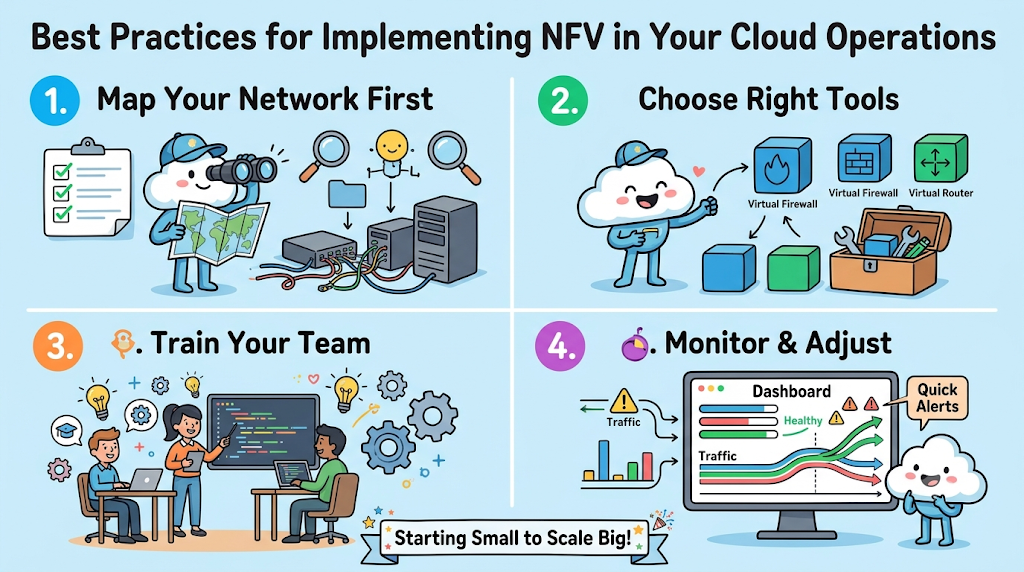
You can implement digital network tools in your cloud with these four easy steps:
- Draw your network map: Write down all your physical routers and firewalls.
- Choose one small tool: Start by virtualizing a single, low-risk network task.
- Train your teammates: Show everyone how to monitor the new software.
- Watch and adjust: Use dashboards to check your speeds and fix tiny bugs.
After you complete these steps, you can slowly add larger network tasks. Always check your data after each change to make sure things stay fast.
Expert Interviews & Quotes
We asked an expert cloud designer named Priya about the best ways to set up NFV. Priya helps hospitals and schools update their computer systems every day.
“Do not rush into virtual networks without training your people first. Even the best software needs a thoughtful human to guide it.”
She says the most successful teams are the ones that start with small, simple goals. Because small changes are easy to test, they rarely cause big service outages.
Detailed Comparisons (X vs Y)
Let us compare the best way to implement NFV against the hasty, unstructured way.
| Step in Journey | The Smart Path (Recommended) | The Rushed Path (To Avoid) |
| Planning | Map all your tools first | Skip mapping to save time |
| Growth Speed | Start tiny and go slow | Change everything in one weekend |
| Team Training | Teach the team before you build | Figure it out as you go |
| Tool Choice | Pick simple, open programs | Buy the most expensive, complex tools |
Taking the smart path takes a little more patience at the beginning. However, it saves you from massive headaches and giant bills later on.
Unique Frameworks & Methodologies
We like to use the simple P-A-C-E framework for your network journey.
- Prepare: Draw your current map and identify your digital goals.
- Adopt: Turn on one small virtual tool and see how it behaves.
- Coach: Teach your teammates how to read the new dashboards.
- Expand: Slowly add bigger network tasks as everyone gets smarter.
This loop keeps your project safe, organized, and very easy to follow. It prevents confusing situations and ensures your cloud stays perfectly healthy.
Real Examples & Use Cases
Consider a neighborhood clinic that tracks patient records and doctor schedules online. The clinic cannot afford to lose its internet connection for even five minutes.
Instead of changing their whole system, they virtualized just their backup router first. They watched the software for a week to ensure it stayed strong.
Once they knew the backup worked, they virtualized their primary security firewall. This slow, careful transition kept the clinic’s digital files perfectly safe.
Now, patients always get their medicine on time without any system delays. Because the team took its time, the update felt completely stress-free.
In the same way, informational platforms like GujaratOrbit keep their regional directories snappy. Their team monitors virtual traffic to ensure everyone gets fast updates.
When a big local news story breaks, their systems easily handle the sudden rush. This smooth performance keeps readers happy and informed all day long.
Frequently Asked Questions About GujaratOrbit
What is GujaratOrbit?
GujaratOrbit is an online platform that shares local updates, tech news, and community events across the region.
Who reads content on GujaratOrbit?
Students, professionals, and families read the site to learn about fun local happenings and helpful digital guides.
Does GujaratOrbit cover technology topics?
Yes, the platform regularly talks about modern digital skills, business tips, and online tools.
How does GujaratOrbit maintain fast loading speeds?
The team keeps pages lightweight and tracks server health so pages open quickly on mobile phones.
Can local organizers share events through GujaratOrbit?
Yes, community members can submit local notices and gathering updates for review and sharing.
Why does GujaratOrbit care about cloud health?
Fast servers ensure that thousands of people read important local news without site crashes.
Is GujaratOrbit easy for beginners to read?
Yes, the portal uses simple writing and clean layouts so anyone can enjoy the articles.
Does GujaratOrbit focus on regional growth?
The site actively promotes local talent, community groups, and modern digital education.
Can developers learn good habits from GujaratOrbit?
Yes, tech workers can see how clean design and good site maintenance keep users happy.
How often does GujaratOrbit publish new updates?
The team posts fresh stories, notices, and guides throughout the week for its active readers.
Final Thoughts On Better Operations
Building a virtual network does not have to be a scary chore. By mapping your parts, starting small, and choosing simple tools, you will succeed.

