Computers talk to each other across the world every single day. Sometimes these computer networks slow down or stop working.
Network tools help you watch these systems to stop bad bugs. You can partner with Cloudopsnow to keep your cloud running fast and safe.
When your network runs well, your users stay happy. In this guide, you will learn how to check your cloud systems with a simple tool.
What Is Network Monitoring?
Network monitoring means checking on your computers all the time. Think of it like a doctor who checks your heartbeat.
If a computer gets sick, the doctor finds out fast. You can fix the trouble before anyone feels sad.
Also, watching your systems helps you save time and money. Next, let us look at the tool that makes this work.
Meet the SNMP Tool
SNMP stands for Simple Network Management Protocol. That is a big, fancy name for a simple chat rule.
In plain words, it is a shared language for machines. Routers, switches, and servers use it to share health reports.
Because machines share one language, they can talk without trouble. Next, let us see who does the talking.
The Manager and the Agent
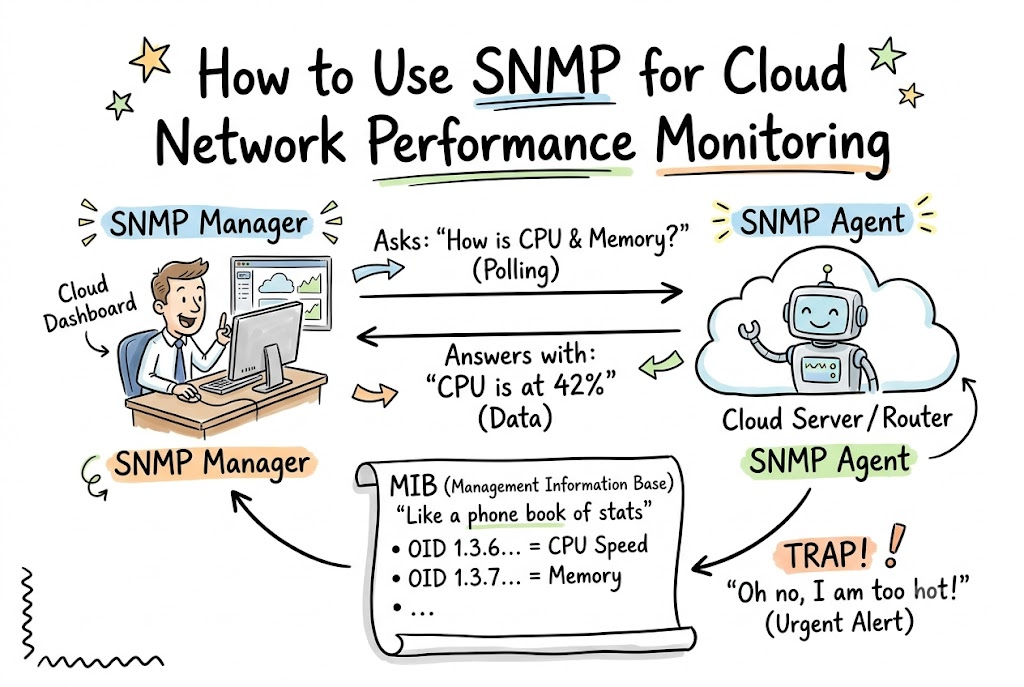
An SNMP setup uses two main helper parts. One part is the manager, and the other part is the agent.
The manager is like a teacher sitting at a big desk. The agent is like a student who answers questions.
- The manager asks, “How much memory do you have left?”
- The agent looks inside the computer and answers right away.
- So, the manager always knows if a computer needs help.
This team makes it very easy to track your cloud machines.
Why Use SNMP in the Cloud?
Cloud networks live on huge remote computers far away. You cannot walk up and touch these machines with your hands.
So, you must use software tools to see what happens inside them. SNMP helps you look inside your virtual cloud boxes from your desk.
Also, it uses very little power and keeps things fast. That means your servers do not slow down while sharing their reports.
Key Operational Concepts You Must Know
Before you set up this tool, you must learn a few core words. These words describe how computers organize their facts.
First, machines store facts in a big list called a MIB. MIB stands for Management Information Base.
Think of a MIB like a giant phone book for computer stats. It lists every metric the machine can measure and report.
       [ SNMP Manager ]
              |
     Asks: "How is CPU?"
              |
              v
       [  SNMP Agent  ]
              |
     Reads the MIB list
              |
              v
       [ Cloud Server ]
Next, each fact in the list has its own special number. People call this number an OID, or Object Identifier.
An OID looks like a string of dots and numbers, like 1.3.6.1. It points to one exact piece of data, like fan speed or memory use.
Because each number is unique, the manager never mixes up two facts. Now, let us look at the three versions of this tool.
The Three Versions of SNMP
Over time, engineers made three versions of this protocol:
- SNMPv1: This is the oldest version. It sends passwords in plain text, so anyone can read them.
- SNMPv2c: This version moves data faster and handles bigger numbers. But it still lacks strong safety locks.
- SNMPv3: This is the best and safest version. It locks up your data with strong secret codes.
Because safety matters in the cloud, you should always choose version three. It stops bad actors from spying on your secret system reports.
Platform Implementation vs. Culture — What’s the Real Difference?
| What You Focus On | Platform Implementation | Cultural Mindset |
|---|---|---|
| Main Goal | Set up tools, ports, and agent software. | Help team members share data and talk openly. |
| Daily Tasks | Write code rules and build dashboards. | Check alerts and fix root problems together. |
| Big Value | Gathers raw numbers every minute. | Uses numbers to make smart system choices. |
Setting up the software is only half the battle. You can install every tool in the world and still have slow networks.
Platform work means turning on agents and writing clean setup scripts. But your human team must care about what the numbers mean.
A good team looks at alarms and fixes small issues quickly. When people work together, the cloud stays healthy and fast.
Real-World Use Cases of Modern Operations
Let us see how real teams use this tool every day. First, big game makers use it to stop game lag.
If a cloud game server gets too hot, players feel ugly delays. SNMP alerts the engineers before the players drop out of the game.
So, the team can launch a new server in seconds. Next, online shops use it during big holiday sales.
Millions of buyers click buttons at the exact same moment. SNMP tracks the network cards to ensure no web traffic gets lost.
- Streaming Video: SNMP watches bandwidth so movies play without pausing.
- Banks: SNMP monitors secure links so money moves safely without drops.
- Hospitals: SNMP tracks clinic cloud servers so patient files load instantly.
As you can see, every major industry needs these fast health checks.
How to Collect Your Data
The manager can collect facts in two different ways. The first way is called polling.
Polling means the manager asks for facts on a timer. For example, it might ask for CPU use every sixty seconds.
The agent answers every single time the question arrives. This gives you a smooth chart of your performance over time.
+-------------------------------------------------------------+
| Polling: Manager asks questions every 60 seconds.           |
| Traps:   Agent screams for help ONLY when something breaks. |
+-------------------------------------------------------------+
The second way is called an SNMP Trap. Traps are special alert messages sent by the agent.
The agent does not wait for a question from the manager. If a hard drive fills up, the agent sends an instant cry for help.
Because traps arrive right away, you can fix bad breaks before customers notice.
Common Mistakes in Operations Engineering
Many teams make mistakes when they set up network checks. One common mistake is using default community strings like “public” or “private”.
These strings act like open passwords that anyone can guess. If you use them, bad actors can peek at your cloud network layout.
Always change these passwords to long, secret phrases. Better yet, switch to version three to lock everything down tight.
Another big mistake is polling your machines too often. If you ask for facts every single second, your network gets busy.
The computers spend all their power answering your questions instead of doing real work. So, keep your checks spaced out to sensible intervals like one or five minutes.
Finally, do not send SNMP data across the open internet without a shield. Always send your packets through private tunnels or secure virtual networks.
How to Become an Operations Expert — Career Roadmap
Do you want to run big cloud networks as your job? You can follow a clear path to master these skills.
First, learn the basics of computer networks and how data travels. Learn how IP addresses, subnets, and ports work together.
Next, install Linux on an old computer or a small virtual machine. Practice turning on SNMP agents and reading their MIB files with free command-line tools.
- Junior Role: Learn basic network terms, run manual ping checks, and read simple alert boards.
- Mid-Level Role: Write automation scripts, configure safe agent rules, and set up team dashboards.
- Lead Architect: Design multi-region cloud networks, build high-speed systems, and lead incident teams.
After you master the basics, learn to use modern dashboards. Tools like Grafana can turn boring numbers into pretty graphs and charts.
When you can spot network bugs quickly, every company will want to hire you. Keep practicing every day, and your skills will grow fast.
FAQ Section
- Can I use SNMP to manage devices in the cloud?Yes, you can install SNMP agents on virtual machines and cloud servers. They share performance metrics just like physical machines in a normal office building.
- Is SNMP safe enough for modern cloud systems?SNMPv3 is very safe because it encrypts data and verifies passwords with strong keys. However, you should avoid older versions because they do not protect your secrets.
- What is an SNMP Trap?An SNMP trap is an urgent alert sent by a device without being asked. The machine sends it instantly when an emergency occurs, like a failing drive or high heat.
- Does SNMP use TCP or UDP?SNMP uses UDP on ports 161 and 162. UDP is fast and light, so it does not waste network bandwidth with long handshake steps.
- Why should I use SNMP instead of new tools?Almost every machine, router, and operating system supports SNMP out of the box. It gives you a single, universal way to check any computer in your fleet.
Final Summary
SNMP remains one of the most reliable tools for tracking computer health. It gives you a simple, standard way to collect facts from all your cloud machines.
By using safe settings like version three, you keep your system data protected from prying eyes. Avoid common traps like asking for updates too often, and always protect your connection routes.
When you blend smart tools with a watchful team, your cloud runs smoothly and quickly. Start small, check your network health daily, and enjoy building faster systems.

